Tuesday, 10 September 2013

PHANTOM – What’s Effect of Latest Google Update “Phantom” on SEO ? ?

First PANDA, then PENGUIN and now it’s PHANTOM…

It’s look like, if some would like to hire SEO Firm for their Search Marking Company they just need to hire GOOGLE Only.

As day by day, GOOGLE launching new algorithm in the Search Engine having small or large effects on different search queries. A single point missing in overall SEO Plan of any corporate company, may harm them in negative graph, that’s the current scenario of SEO.

There are lots of factors, few are new and rest other seo points must be in co-ordination with each other to require desired outputs in Google Search Engine.

Few of WeTheDevelopers Clients, which were affected by old Google Updates PANDA and PENGUIN have recovered few seo points from this latest update “PHANTOM” in Search Ranking on Google.

In initial day, you must have heard about lots of guess about effects of this new PHANTOM updates, but that all are JUST Guess, nothing else. One need to give a time of 1 month or 2 to get perfect output to study the result of any update, like we have described in above pera.

4 Reasons to Spend More on SEO

ROI Return on Investment
Google has made dramatic changes in 2013, with the May 22 Penguin update having the biggest impact for small business websites. After some severe reductions in traffic, some webmasters are at least seeing traffic increases in August due, in part, to a Panda softening from Google.
In response, many webmasters are making big shifts in SEO tactics. While long overdue, this is the right move.
Few businesses are looking to move to lower quality SEO services as they now fear Google more than ever. But small businesses run very close to the margin and traditionally resist increasing the SEO budget, regardless of the consequences. Here are four reasons why small business owners should reconsider.

1. Google Asked You To

While many will dismiss this as PR, Google has clearly communicated that they no longer will tolerate SEO tactics that used to work in 2008. Article spinning, keyword stuffing, excessive bookmarks, reborn domains, paid links, thin content, and duplicate content are all not OK.
Even if you haven't received an unnatural link warning, the writing is on the wall. Quality must increase for continued success in SEO. While this message is clearly self-serving for Google, it's important to respect their power in the industry.

2. Recovering From Google Updates is Expensive

There are plenty of websites that have partially recovered from Penguin downgrades, but each case is different. The level of returning traffic varies.
Technical issues on-site are the easiest to fix and should be addressed quickly using Webmaster Tools as the guide. Duplicate content needs to be removed immediately.
Keyword-stuffed titles need to be edited. Thin content, a favorite among many, should be replaced with real content marketing.
Off-site issues, such as bad link building, are particularly hard to fix. It is very ironic that firms now exist to send "link removal request" emails to other firms who were previously retained to build those links.
Small business needs to stop doing bad link building and embrace content marketing. They need to get creative and experiment with newsjacking.
All of these activities cost money. Smart business owners are thinking toward the future and deciding to spend more on SEO now (via higher quality services) to avoid repeating this activity in 2014.

3. SEO Has Merged With Marketing

Many small business webmasters were using a "set-it-and-forget-it" SEO strategy, believing that they need not worry about SEO after hiring a firm. This violates one of the major tenets of business process outsourcing, which is to outsource process and execution, but maintain strict performance monitoring and accountability.
It isn't surprising that many small businesses are feeling buyer's remorse, wishing they had done greater due-diligence in the vendor selection process and better understood the risks associated with SEO.
It should be clear at this point that SEO is no longer a technical exercise and is rapidly merging with marketing and public relations. Smart CEOs recognize the strategic importance of SEO in our digital world. For this reason, they find ways to amplify SEO in allmarketing activities. Ironically, many companies have SEO opportunities they don't harness.
For example, every employee should maintain a "work" Twitter account and share industry news, blog posts and company specials to help spread content. This type of integrated SEO marketing execution is the future, and will draw more budget dollars.

4. SEO ROI Remains High

The data suggests that SEO is still a great investment. This means that small business shouldn't necessarily shop for the cheapest SEO vendor, but consider the return they can make on their money if they spend more:
  • SEO remains a very high ROI activity.
  • The cost-per-lead for SEO is still very attractive.
  • Google has significantly tightened the requirements for high-quality SEO.
  • Integrated marketing strategies have big efficiencies.

Conclusions

All technologies and industries mature, and price-points typically change dramatically along the way. SEO is following the same playbook as most other young industries.
In the last few years we have seen SEO move from infancy to adolescence, with the Google algorithm updates as mileposts. While SEO will become more difficult and expensive to execute, the return on investment remains high for small business. In the end, ROI is more important than the absolute number of a budget line item.

Using Google Keyword Planner (and Other Tools Instead) for Keyword Volume

While far from a perfect tool (seriously skewed toward "commercial intent," not always inclusive of trend data, difficult to drill down into local terms), the Google Keyword Tool was one of the best keyword research tools available. The keyword volume numbers were more trustworthy than other keyword tools, simply because they came right from the source—who better to know what kind of search volume keywords get than Google itself?
With Google's recent announcement that their free Keyword Tool has gone away, replaced with their integrated PPC tool the Keyword Planner, a cry has gone up from SEOs: "What do we do now?"

Google Keyword Planner pros and cons

With the advent of the Keyword Planner, Google is making a strong statement that they'll continue to focus on supporting PPC advertisers rather than organic search marketers. To that end, the Keyword Planner is heavily focused on PPC ads; you even have to sign up for an AdWords account to use it (although you don't have to enter any payment information, and would only end up paying for the tool if you created and launched an ad). That said, the tool definitely retains some SEO utility.
Pros of Google Keyword Planner:
  • Users can now view keyword volume on a hyper-local basis; I was able to view search volume not only for the Oklahoma City area, but even drill down into Norman, the smaller OKC-area town where I live. This is great for businesses doing local and hyper-local SEO to get a better idea of the volume and competition in their geographic area.


  • The tool divides keywords up into suggested ad groups; this is designed to be a PPC-focused feature, but does provide some insight into which keywords Google deems to be semantically/topically related.
  • The "multiply keyword lists" feature allows you to search on combinations of words from two different lists. This allows you to combine your terms with modifiers such as location or color and compare search volume without having to concatenate in Excel.
  • Users can filter out keywords below a certain search volume, so you don't even have to look at them.
  • Since you have to be logged in to use the tool, users aren't limited to 100 words like we were with the logged-out version of the old tool.
Cons of Google Keyword Planner:
  • The ability to select Broad, Phrase or Exact match has been removed—only Exact match data is now available.
  • "Average monthly searches" is calculated over 12 months, meaning the Keyword Planner isn't a good place to research trending topics. Use Google Trends for that.
  • The option to only search for words closely related to your term has been removed. However, Google has said they will probably add it back in.
  • Device targeting is gone—no more segmenting volume for desktop vs. mobile searches. This means volume numbers are, in general, higher for the Keyword Planner than they were for Keyword Tool since those two buckets have been combined.
  • "Local" vs "Global" search volume is no longer automatically displayed. Instead, Global (which Google is now calling "all locations") is the default and users must drill down into specific locales for local search volume. To me, the added functionality around location targeting makes this a mixed blessing, but users will probably miss the easy comparison of seeing Local and Global side-by-side.

Alternative tools for keyword volume

Of course, for some of us, this latest example of data hoarding on Google's part is the last straw. Here are some other places you can look for keyword volume. Since the Google Keyword Tool was free, I kept these options to tools that are free or have a free option (which is why I didn't include the Moz Keyword Difficulty and SERP Analysis tool, even though I love it, since it's only available to paid Moz subscribers).

Google Webmaster Tools impression data

Anyone with a Google Webmaster Tools verified site can view how often their site has shown up for certain keywords.
Pros:
  • This data still comes from Google itself.
Cons:
  • Because it only shows how many impressions your site got from a keyword, GWT Impression data can't be used to research terms you're not already ranking for.
  • There are disputes about the accuracy of the data—the consensus among SEO pros is that it's less reliable than the Keyword Tool data was.

Bing Keyword Tool

The Bing-provided alternative to the Google Keyword tool goes a long way toward making up for the tool's departure. It's what we use in our Keyword Difficulty and SERP Analysis tool.
Pros:
  • Users can narrow searches by date range, to more accurately track recent search data.
  • Recent keyword volume trend data displays alongside other metrics.
  • A "strict" filter acts like the old "closely related" filter in Google's Keyword Tool.
  • The tool is in Beta, so it's likely we'll continue to see more features and improvements as the Bing team keeps working on it.
Cons:
  • Because this data comes from Bing, which has fewer users, all search volume numbers will skew lower than they would in Google.
  • Geographic drilldown is only available at the country level.
  • Users must be signed in to a Bing Webmaster Tools account with a verified site in order to use the tool (but you should be checking Bing Webmaster Tools anyway, it's free and there's a lot of good stuff in there).

Saturday, 7 September 2013

Keyword Planner has replaced Keyword Tool


With Keyword Planner, we've combined the functionality of Keyword Tool and Traffic Estimator to make it easier to plan search campaigns. That's why Keyword Tool is no longer available. You can use Keyword Planner to find new keyword and ad group ideas, get performance estimates for them to find the bid and budget that are right for you, and then add them to your campaigns.

Note
The external Keyword Tool is also no longer available. If you want to get keyword ideas using Keyword Planner, make sure to sign in to your AdWords account.

We've also added several new features with Keyword Planner. As you start to use Keyword Planner, you'll likely notice some differences between Keyword Planner and Keyword Tool. Read on to learn more about what has changed.

No match type data for search volume

With Keyword Tool, we showed you broad match statistics by default with the ability to get data for other match types, like phrase and exact match. But with Keyword Planner, you'll get historical statistics only for exact match. To decide what match type to use, add the keyword idea to your plan and review the traffic estimates for each match type. This change will help you get an accurate estimate of how much traffic you can expect to get with different match types. There’s quite a bit of overlap between broad and phrase match keywords, and the search volume statistic in Keyword Tool didn't take that overlap into account. Traffic estimates like click and cost do take this overlap into account, so checking those can help you decide which match type to use.

For example, let's say your keyword is dark chocolate. If you want to check that keyword's average monthly searches, we'll show you the same stats whether you use a broad, phrase, or exact match type with dark chocolate. Traffic estimates like clicks and cost, on the other hand, do take into account keyword match types. For example, if you get estimates for a list of broad match keywords, we'll take into account any overlap between those keywords.

No device targeting

Keyword Planner doesn’t let you specifically target mobile devices, like tablets and mobile phones. By default, it targets all devices, which is in line with recent changes made to AdWords campaigns. We’re working on a feature that’ll allow you to get traffic estimates by device type and set bid adjustments for mobile devices.

Note
In general, you'll notice that the average search volume data is higher in Keyword Planner as compared to the exact match search volume data you got with Keyword Tool. That's because we'll show you the average number of searches for a keyword idea on all devices (desktop and laptop computers, tablets, and mobile phones). With Keyword Tool, we showed you average search volume for desktop and laptop computers by default.

Other changes in the data columns


In Keyword Planner, you'll notice several different data columns than those that you were used to seeing in Keyword Tool. Here are the differences:

Local monthly searches and global monthly searches: These two columns have been replaced by the "Average monthly searches" column, simplifying the search volume data you can get. The average monthly search volume is specific to your targeting settings, and you can get data for an entire country or individual cities and regions within a country. Note that you can still get global monthly search data by targeting all locations.

Ad share: This column is being replaced with a new column called ad impression share to help you look for potential impressions.

Google Search Network: This column has been replaced by the network option within the targeting settings. To get data for the entire Search Network, select the "Google and search partners" targeting option.
Search share: This column has been retired.

Approx. CPC (Search): This column has been replaced by the "Avg. CPC" column. You'll get more accurate data in the average cost-per-click column than you did in the approximate cost-per-click column.
Local search trends: This column doesn't appear in the Keyword Planner interface. However, you can still get search volume trends by hovering over the icon in the "Avg. monthly searches" column. You can also see these trends segmented by month when you download your historical statistics from Keyword Planner.

Extracted from webpage: This column has been removed from the Keyword Planner interface. However, you can still get the webpage the keyword idea came from when you download your historical statistics from Keyword Planner. Note that you'll only get this data when you search for keyword and ad group ideas based on a URL, like a webpage on your website.

Next steps

Learn how to use Keyword Planner.

Get more details about the historical statistics and performance estimates you can get with Keyword Planner.
Keywords
Using Keyword Planner to get keyword ideas and traffic estimates
Understanding your Keyword Planner statistics and traffic estimates
Keyword Planner has replaced 

Sunday, 1 September 2013

Expert SEO Service Provider in Ahmedabad, Gujarat, India

Hope you all are well…!!!

I am Ankit Nayak SEO & eMarketing Expert and Consultant and a leading internet marketing solution provider with great expertise in Search Engine Optimization and social media optimization. I work as per the latest norms of search engines to drive maximum organic traffic to your website.


I have more than 4 years of experience in Internet Marketing and handled various jobs worldwide. I can do higher search result on major search engines and serve 100% customer satisfaction services to my clients. I am entitled to provide best Search Engine Optimization services at very affordable rates comparing the market.

I have expertise in SEO, Internet Marketing, Pay per Click Campaign, Link Building and SEO E-Commerce Solution. Being a leader in SEO, I know what works on web and how a website can get top placement on search engines to fetch optimum use to resources.

My clientele includes clients from different locations across the globe and Iam committed to deliver the results inline to the clients expectations, I always keep myself updated with the latest changes of search engine and formulates my strategy on the firm ground of analysis so that the client may fetch the best results.

Let me know if anyone are interested in SEO service.


Thanks & Regards

Ankit Nayak - Sr. SEO Expert and Consultant
Contact No - +91 7600593702

Gtalk:- seomaster7698@gmail.com

Tuesday, 30 July 2013

How To SEO Optimize Blogger Archive Links

Hi ! Every One. Friends My Last posts were related to Blogger Tutorials, Blogger Widgets and SEO. Now once again I am giving You another SEO Tutorial, In this tutorial I will tell You to "How to SEO Optimize Blogger Archive Links?". I have tried my best in this post to help you in optimizing your Blog Archive Links. We optimize blogger Archive Links to do better SEO of our website and to help search engines to read and crawl our website data. In Blogger we have to optimize Blogger Labels, Blogger Comments and Blogger Archive Links. In the last two posts I have given the tutorial on Optimization of Blogger Labels, Blogger Archive Links and now this post is regarding the Optimization of Blogger Archive Links. Now first I will give you a little description about the blogger Archive Links and after that we will learn that "How to SEO Optimize Blogger Archive Links?". Lets begin with the description........

What Are Blogger Archive Links ?

SEO Optimize Archive Links
SEO Optimize Archive Links.

Blogger Archive Links are the links those hold our website or blog history. The history can be in the form of Month, Days or Years. These links creates problem and confusion for search engines in crawling and detecting youer website data. Now question is that how these links creates problems ? 
 
The answer is that one page of your website must

have only one single link that search engine have to crawl but due to browsing and your visitor views some other links( Archive links ) are created automatically  So, in this way these links confuses search engines robots in detecting and crawling your web data. Now hope that you have understand that what are Blogger Archive Links ? and why we optimize them?. Now our next step is to Optimize Blogger Archive Links so Let's do it......

How To SEO Optimize Blogger Archive Links?

SEO Optimize Archive Links.

To SEO Optimize Blogger Archive Links follow the simple steps given below:

    First log in to your Blogger Account.

    Go to template.
    Click on Edit Html > Edit Template.Using CTRL+F key find this code  <a class='post-count-link'exp:href='data:i.url'>
    Now just replace above code with this code given below :

         <a rel="archives" class='post-count-link'expr:href='data:i.url'>

    Save your template and now you have successfully optimized your Blogger Archive Links.

If you have any question or confusion in optimizing your blogger Archives Links or any other question related to SEO, Blogging then you are free to ask any question. Simply write your question in the comment box and I will give you the best answer to you.  

If you miss My previous posts then don't worry, below are the posts that will be helpful to you in increasing your website traffic and also check out the best SEO tips. Just click on The link below and you will be able to see all of my previous posts. - See more at: http://mybloggingnest.blogspot.in/2013/06/how-to-seo-optimize-blogger-archive.html#sthash.2gfE1Gko.dpuf

Saturday, 20 July 2013

BloggerLeaf ~ Blogger Template Free Download

T
oday I’m excited to share this awesome blogger template with all of you, i love to design themes for blogger and wordpress, also i can convert any wordpress theme to blogger and blogger to wordpress, many of our readers asked me for the software for cloning any themes and always i said that i haven’t any software for cloning themes , it’s my hobbies, expertness and hard working only

BloggerLeaf is free blogger template, it’s look wise  similar to bloggermint.com with green and white combination and suit with all type of blogs as well. In this template i have also designed awesome blogger threaded comments system with helps of  CSS, but Earlier some week, Google launched its new Google+-powered commenting system for Blogger, then you can easily set up Google+ commenting system in to this template.

Most of designers makes unreadable CSS and HTML codes in to template because they gives you template in free of cost they trying to add many hidden links in to template then after applying the template to your blog you can’t customize or edit into template and also theirs hidden links bad effects to your SEO (Search Engine Optimization), so be aware from it, but in this template infact in my all templates you can edit and customize template easily, and always SEO Optimized as well, that’s why thousands of bloggers uses our templates for their blog. :)

Live Preview :

BloggerLeaf-Blogger Template by Making Different
Click Thumb to Enlarge

Page Layout Preview

Layout
Click Thumb to Enlarge

Features :

  • SEO Optimization
  • Adsense Optimization
  • Numbered Page Navigation
  • Top Navigation Menu
  • Fast Loading
  • Fast Loading Google Fonts
  • 3 Column Footer Widgets
Note : - I am giving this template to you in free.I don’t want anything from you but please don’t remove our link from footer of this template.

DemoDownload

Drop your comments, queries, questions, suggestions below… :)

Friday, 12 July 2013

How To Add Meta Tags To Blogger Blog

What is Meta Tags ?

Meta tags are the codes of the website they are used to provide the data to search Engines. They helps you to drive more traffic from papular search engines like :- Google, Bing, Ask, Yahoo. They are not important for website ranking.
How To Add Meta Tags To Blogger Blog

Importance of Meta Tags

Meta tags are most useful for any website to get more traffic from search engines. like- Google Search Engine. Meta tags are useful to Index your Pages and Posts Quickly in Search engines. Meta tags are play important role in website SEO.


How To Add Meta Tags ?

To adding meta tags is very easy. Just Follow the below steps one by one and Improve your site stats in search Engines.

1. Goto Blogger.com > Template
2. Click on Edit HTML
3. Now Press  Ctrl + F > Search For Following Code..

 <title><data:blog.title/></title>
4. Replace the Above Code With the Below Code.

<b:if cond='data:blog.url == data:blog.homepageUrl'>
<title><data:blog.title/></title>
<META CONTENT='Your Site DESCRIPTION' NAME='Description'/></b:if>
<META CONTENT='Your Site KEYWORDS' NAME='Keywords'/>
<META CONTENT='AUTHER NAME' NAME='Author'/>
<META CONTENT='FOLLOW,INDEX' NAME='robots'/>
<b:if cond='data:blog.pageType == &quot;index&quot;'>
<title><data:blog.title/></title> <b:else/>
<title><data:blog.pageName/></title> </b:if>
<b:if cond='data:blog.pageType == &quot;item&quot;'>
<meta expr:content='data:blog.pageName' name='Keywords'/></b:if>


5. Change The Light Red Portion with your website Information.
6. Save Your Settings.


How to Add Google Analytics to WordPress in Three Simple Steps

Even though the dark overlords at Google have restricted a lot of the data that used to be available in Analytics, it’s still an extremely valuable tool for gathering intelligence on your site visitors. Analytics can show you where they landed, what they read, how long they stayed, what they were searching for, and a heap of other valuable stuff.

You can add Google Analytics to WordPress in 3 easy steps
Google Analytics gives you a closer look at your site’s performance
As a serious WordPress blogger who aspires to greatness, you really can’t afford to be without it. This article shows you how to add Google Analytics to WordPress with minimal fuss and very little effort.

Step One: Get a Google Analytics account

If you haven’t already signed up for analytics, you’ll need to venture over to Google and get hooked up with a free account. Don’t worry, it’s quick and painless.
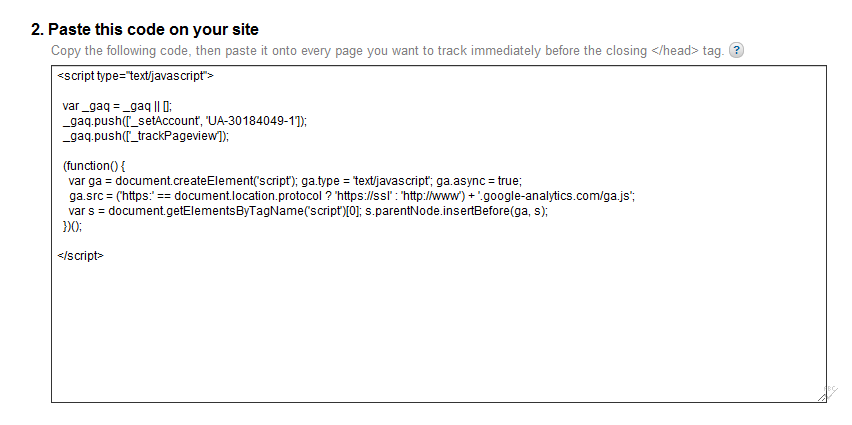
Once you’ve completed the sign up process, you’ll be given a piece of JavaScript code. It looks like this:

This is the JavaScript code you need to add to your site to use Google Analytics
This code allows Google to gather anonymous data on how your website is being used

Featured Plugin - WordPress Ecommerce Shopping Cart Plugin

Out of all the WordPress ecommerce plugins available, MarketPress has got to be the winner - easy to configure, powerful functionality, multiple gateways and more. A simply brilliant plugin!
Find out more

Step Two: Add the Google Analytics code to your WordPress theme

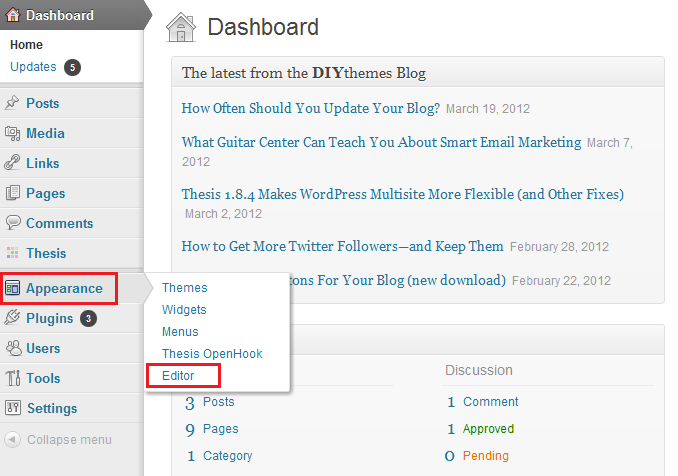
To do this, you’ll need to open up the footer.php file of your WordPress theme. You can either use an FTP client to access your server, or edit your theme files directly from the WordPress dashboard. Your file editor is located under the ‘Appearance’ tab in the sidebar menu.
This is how you paste your Google Analytics code into your WordPress theme
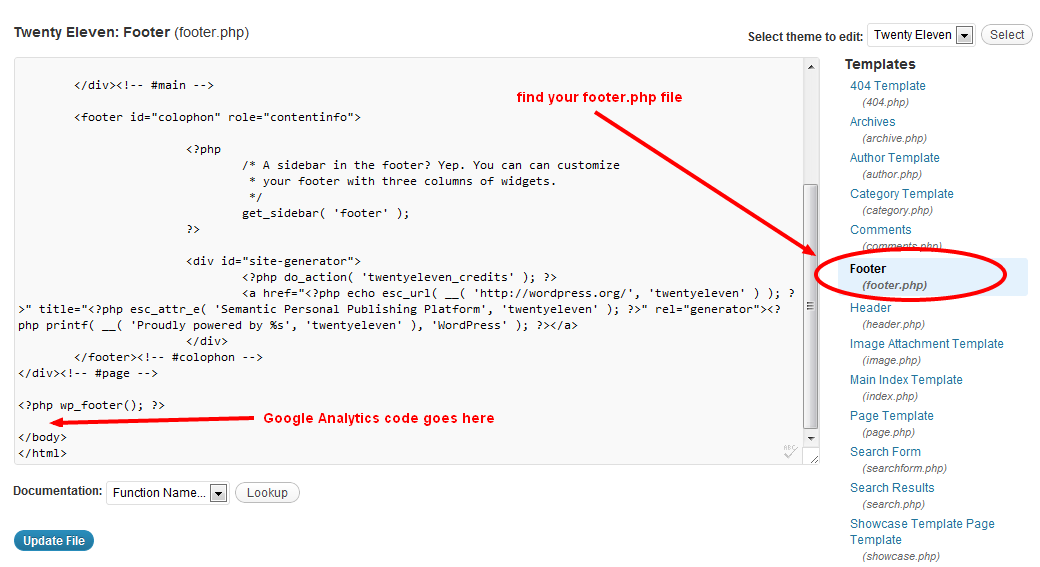
In the list of template files to the right of the text editor, find footer.php and open it. To add Google Analytics to WordPress, you now just need to copy and paste your code immediately before the closing </body> tag. Like so:
This is how you paste code into your footer.php file
Make sure you save your footer.php file once you’ve pasted in the new code. Google Analytics should now be able to track every page of your WordPress site and provide you with that sweet juicy data.

Tuesday, 9 July 2013

Top 10 Microblogging sites


1- Twitter - Allows you to send small posts known as 'tweets' upto 140 characters in length.

2-  Posterous- Although it has been acquired by Twitter, but still you can create your own spaces on Posterous.

3- Friedfeed - Second most popular to Twitter and allows you to share interesting stuff with your friends.

4- Plurk - With an extremely simple interface, it allows you to share any stuff as short posts. 

5- Identi.ca - Another Microblogging service slowly gaining popularity.

6- Meemi - Combines the power of social blogging and social networking together. 

7- Tout- Allows you to create 15 seconds video updates on your phone.

8- Ima Hima- A Japanese Microblogging site allowing you to update your current status of location, activity and mood.

9- Dailybooth- Have your say with a picture.

10. Brightkite: Brightkite helps members in connecting with the people and places around you.


11. Pownce: With Pownce I can post messages, links, files, or events which are viewable by friends and fans of an individual. Pownce also serves as an advertising channel.

12. Microblogr: Microblogr is a microblogging and social networking service allows instant collaboration with friends from the network using their SMS feature. It allows communication with members through their index page and also on their mobile phone if this service is activated by them.

13. Yammer: Yammer is a great tool for companies and organizations to update them of their member’s activities. This is an excellent microblogging tool for coworkers in any company or organization and the privacy of every member and the company is secured as those who can access are only those with a valid company email address.

14. Dailybooth: Dailybooth is a micro-blogging platform that deals only in pictures. The concept behind Dailybooth is to take and upload a picture of you everyday even if it is a bad hair day. It’s simple to use – you upload or email in your pictures and it’s done.

15. MySay: MySay is a unique microblogging platform where instead of text updates, users call MySay and say how they are doing today. Then, friends or family can listen via phone, e-mail, or the web.

16. Hictu: Hictu is a service for video microbloggers. A webcam and a mouse-click is all that is needed to create a video post here.

17. 12 Seconds: 12 Seconds is a micro-blogging video website.

18. Utterli: Utterli is a hybrid social media posting site where you can upload multiple types of media including voice files and post on a timeline.

19. Frazr: Frazr is a Twitter like microblogging site focused primarily on the French and German markets.

20. Rememble: Rememble is a 'washing line' for your digital bits and pieces. Thread together texts, photos, videos, sounds, scribbles, scans, notes and even tweets so they're not drifting in a digital wasteland.

21. Mixin: Mixin is the place where people can easily share their micro-agenda like small info that is interesting when it is about getting organized with friends.

22. Spotjots: Spotjots is a microblogging service which combines geo location and mapping for real time sharing of information. Here a member can send in updates which are geo located and mapped out that can be viewed by the friends.

23. AQA2U: AQA2U is essentially a micro-publishing platform that allows premium-rate SMS mobile question and answer. Using AQA anyone can stay in touch with friends, fans and followers, making money for themselves or charities at the same time.

24. Open Microblogging: This is an open standard that allows users on different micro-blogging services to communicate with each other.

25. Meemi: Meemi enables one to share thoughts, links, images, videos on the web with friends easily.

26. Koornk

27. You are

28. Qaiku

29. Secondbrain

30. Watwet

31. Adocu (nanoblogging service)

32. Floort

33. Cromple

34. Bloggino

35. PageMEME

36. Squiper

37. Cestu

38. Zannel

39. tinySCRAP.com

40. TextCurve.com

41. Unitymix

42. Swebbo

43. Myyearbook

44. Hellotxt

However, Even though there are over 40 Sites List to choose from a user may not be able to effectively use more than 5 sites. You can pick the sites which are best suited for your usage and concentrate on them.