Tuesday, 30 July 2013

How To SEO Optimize Blogger Archive Links

Hi ! Every One. Friends My Last posts were related to Blogger Tutorials, Blogger Widgets and SEO. Now once again I am giving You another SEO Tutorial, In this tutorial I will tell You to "How to SEO Optimize Blogger Archive Links?". I have tried my best in this post to help you in optimizing your Blog Archive Links. We optimize blogger Archive Links to do better SEO of our website and to help search engines to read and crawl our website data. In Blogger we have to optimize Blogger Labels, Blogger Comments and Blogger Archive Links. In the last two posts I have given the tutorial on Optimization of Blogger Labels, Blogger Archive Links and now this post is regarding the Optimization of Blogger Archive Links. Now first I will give you a little description about the blogger Archive Links and after that we will learn that "How to SEO Optimize Blogger Archive Links?". Lets begin with the description........

What Are Blogger Archive Links ?

SEO Optimize Archive Links
SEO Optimize Archive Links.

Blogger Archive Links are the links those hold our website or blog history. The history can be in the form of Month, Days or Years. These links creates problem and confusion for search engines in crawling and detecting youer website data. Now question is that how these links creates problems ? 
 
The answer is that one page of your website must

have only one single link that search engine have to crawl but due to browsing and your visitor views some other links( Archive links ) are created automatically  So, in this way these links confuses search engines robots in detecting and crawling your web data. Now hope that you have understand that what are Blogger Archive Links ? and why we optimize them?. Now our next step is to Optimize Blogger Archive Links so Let's do it......

How To SEO Optimize Blogger Archive Links?

SEO Optimize Archive Links.

To SEO Optimize Blogger Archive Links follow the simple steps given below:

    First log in to your Blogger Account.

    Go to template.
    Click on Edit Html > Edit Template.Using CTRL+F key find this code  <a class='post-count-link'exp:href='data:i.url'>
    Now just replace above code with this code given below :

         <a rel="archives" class='post-count-link'expr:href='data:i.url'>

    Save your template and now you have successfully optimized your Blogger Archive Links.

If you have any question or confusion in optimizing your blogger Archives Links or any other question related to SEO, Blogging then you are free to ask any question. Simply write your question in the comment box and I will give you the best answer to you.  

If you miss My previous posts then don't worry, below are the posts that will be helpful to you in increasing your website traffic and also check out the best SEO tips. Just click on The link below and you will be able to see all of my previous posts. - See more at: http://mybloggingnest.blogspot.in/2013/06/how-to-seo-optimize-blogger-archive.html#sthash.2gfE1Gko.dpuf

Saturday, 20 July 2013

BloggerLeaf ~ Blogger Template Free Download

T
oday I’m excited to share this awesome blogger template with all of you, i love to design themes for blogger and wordpress, also i can convert any wordpress theme to blogger and blogger to wordpress, many of our readers asked me for the software for cloning any themes and always i said that i haven’t any software for cloning themes , it’s my hobbies, expertness and hard working only

BloggerLeaf is free blogger template, it’s look wise  similar to bloggermint.com with green and white combination and suit with all type of blogs as well. In this template i have also designed awesome blogger threaded comments system with helps of  CSS, but Earlier some week, Google launched its new Google+-powered commenting system for Blogger, then you can easily set up Google+ commenting system in to this template.

Most of designers makes unreadable CSS and HTML codes in to template because they gives you template in free of cost they trying to add many hidden links in to template then after applying the template to your blog you can’t customize or edit into template and also theirs hidden links bad effects to your SEO (Search Engine Optimization), so be aware from it, but in this template infact in my all templates you can edit and customize template easily, and always SEO Optimized as well, that’s why thousands of bloggers uses our templates for their blog. :)

Live Preview :

BloggerLeaf-Blogger Template by Making Different
Click Thumb to Enlarge

Page Layout Preview

Layout
Click Thumb to Enlarge

Features :

  • SEO Optimization
  • Adsense Optimization
  • Numbered Page Navigation
  • Top Navigation Menu
  • Fast Loading
  • Fast Loading Google Fonts
  • 3 Column Footer Widgets
Note : - I am giving this template to you in free.I don’t want anything from you but please don’t remove our link from footer of this template.

DemoDownload

Drop your comments, queries, questions, suggestions below… :)

Friday, 12 July 2013

How To Add Meta Tags To Blogger Blog

What is Meta Tags ?

Meta tags are the codes of the website they are used to provide the data to search Engines. They helps you to drive more traffic from papular search engines like :- Google, Bing, Ask, Yahoo. They are not important for website ranking.
How To Add Meta Tags To Blogger Blog

Importance of Meta Tags

Meta tags are most useful for any website to get more traffic from search engines. like- Google Search Engine. Meta tags are useful to Index your Pages and Posts Quickly in Search engines. Meta tags are play important role in website SEO.


How To Add Meta Tags ?

To adding meta tags is very easy. Just Follow the below steps one by one and Improve your site stats in search Engines.

1. Goto Blogger.com > Template
2. Click on Edit HTML
3. Now Press  Ctrl + F > Search For Following Code..

 <title><data:blog.title/></title>
4. Replace the Above Code With the Below Code.

<b:if cond='data:blog.url == data:blog.homepageUrl'>
<title><data:blog.title/></title>
<META CONTENT='Your Site DESCRIPTION' NAME='Description'/></b:if>
<META CONTENT='Your Site KEYWORDS' NAME='Keywords'/>
<META CONTENT='AUTHER NAME' NAME='Author'/>
<META CONTENT='FOLLOW,INDEX' NAME='robots'/>
<b:if cond='data:blog.pageType == &quot;index&quot;'>
<title><data:blog.title/></title> <b:else/>
<title><data:blog.pageName/></title> </b:if>
<b:if cond='data:blog.pageType == &quot;item&quot;'>
<meta expr:content='data:blog.pageName' name='Keywords'/></b:if>


5. Change The Light Red Portion with your website Information.
6. Save Your Settings.


How to Add Google Analytics to WordPress in Three Simple Steps

Even though the dark overlords at Google have restricted a lot of the data that used to be available in Analytics, it’s still an extremely valuable tool for gathering intelligence on your site visitors. Analytics can show you where they landed, what they read, how long they stayed, what they were searching for, and a heap of other valuable stuff.

You can add Google Analytics to WordPress in 3 easy steps
Google Analytics gives you a closer look at your site’s performance
As a serious WordPress blogger who aspires to greatness, you really can’t afford to be without it. This article shows you how to add Google Analytics to WordPress with minimal fuss and very little effort.

Step One: Get a Google Analytics account

If you haven’t already signed up for analytics, you’ll need to venture over to Google and get hooked up with a free account. Don’t worry, it’s quick and painless.
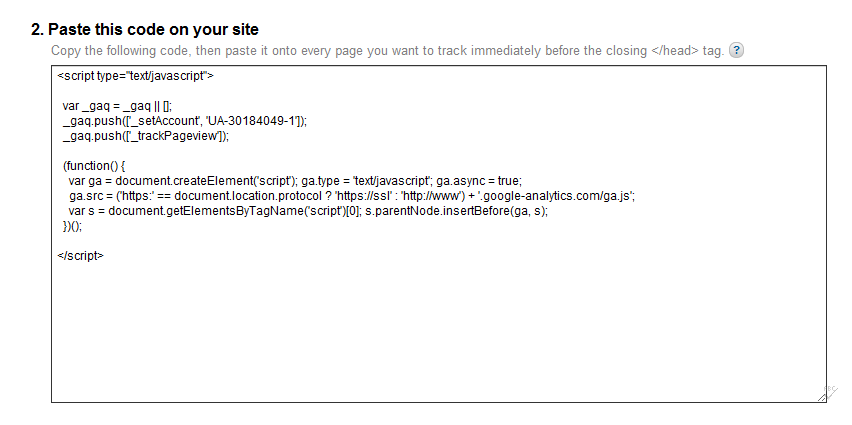
Once you’ve completed the sign up process, you’ll be given a piece of JavaScript code. It looks like this:

This is the JavaScript code you need to add to your site to use Google Analytics
This code allows Google to gather anonymous data on how your website is being used

Featured Plugin - WordPress Ecommerce Shopping Cart Plugin

Out of all the WordPress ecommerce plugins available, MarketPress has got to be the winner - easy to configure, powerful functionality, multiple gateways and more. A simply brilliant plugin!
Find out more

Step Two: Add the Google Analytics code to your WordPress theme

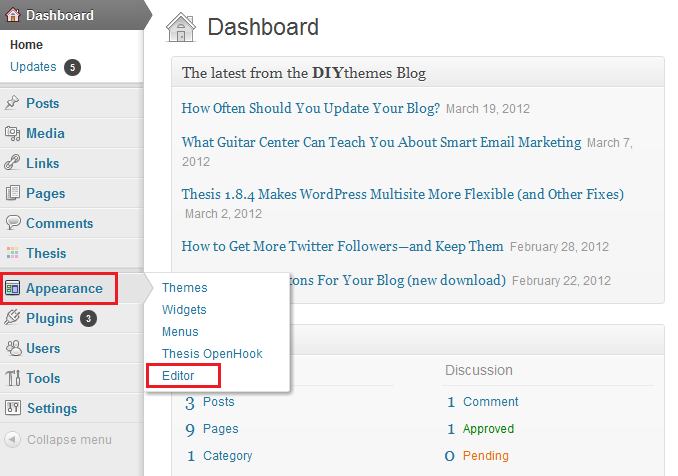
To do this, you’ll need to open up the footer.php file of your WordPress theme. You can either use an FTP client to access your server, or edit your theme files directly from the WordPress dashboard. Your file editor is located under the ‘Appearance’ tab in the sidebar menu.
This is how you paste your Google Analytics code into your WordPress theme
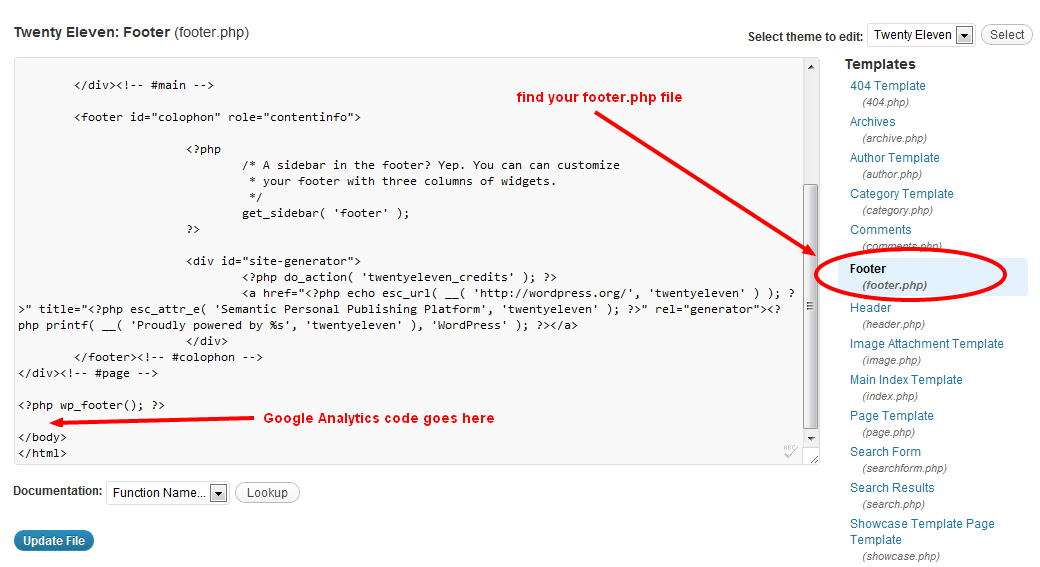
In the list of template files to the right of the text editor, find footer.php and open it. To add Google Analytics to WordPress, you now just need to copy and paste your code immediately before the closing </body> tag. Like so:
This is how you paste code into your footer.php file
Make sure you save your footer.php file once you’ve pasted in the new code. Google Analytics should now be able to track every page of your WordPress site and provide you with that sweet juicy data.

Tuesday, 9 July 2013

Top 10 Microblogging sites


1- Twitter - Allows you to send small posts known as 'tweets' upto 140 characters in length.

2-  Posterous- Although it has been acquired by Twitter, but still you can create your own spaces on Posterous.

3- Friedfeed - Second most popular to Twitter and allows you to share interesting stuff with your friends.

4- Plurk - With an extremely simple interface, it allows you to share any stuff as short posts. 

5- Identi.ca - Another Microblogging service slowly gaining popularity.

6- Meemi - Combines the power of social blogging and social networking together. 

7- Tout- Allows you to create 15 seconds video updates on your phone.

8- Ima Hima- A Japanese Microblogging site allowing you to update your current status of location, activity and mood.

9- Dailybooth- Have your say with a picture.

10. Brightkite: Brightkite helps members in connecting with the people and places around you.


11. Pownce: With Pownce I can post messages, links, files, or events which are viewable by friends and fans of an individual. Pownce also serves as an advertising channel.

12. Microblogr: Microblogr is a microblogging and social networking service allows instant collaboration with friends from the network using their SMS feature. It allows communication with members through their index page and also on their mobile phone if this service is activated by them.

13. Yammer: Yammer is a great tool for companies and organizations to update them of their member’s activities. This is an excellent microblogging tool for coworkers in any company or organization and the privacy of every member and the company is secured as those who can access are only those with a valid company email address.

14. Dailybooth: Dailybooth is a micro-blogging platform that deals only in pictures. The concept behind Dailybooth is to take and upload a picture of you everyday even if it is a bad hair day. It’s simple to use – you upload or email in your pictures and it’s done.

15. MySay: MySay is a unique microblogging platform where instead of text updates, users call MySay and say how they are doing today. Then, friends or family can listen via phone, e-mail, or the web.

16. Hictu: Hictu is a service for video microbloggers. A webcam and a mouse-click is all that is needed to create a video post here.

17. 12 Seconds: 12 Seconds is a micro-blogging video website.

18. Utterli: Utterli is a hybrid social media posting site where you can upload multiple types of media including voice files and post on a timeline.

19. Frazr: Frazr is a Twitter like microblogging site focused primarily on the French and German markets.

20. Rememble: Rememble is a 'washing line' for your digital bits and pieces. Thread together texts, photos, videos, sounds, scribbles, scans, notes and even tweets so they're not drifting in a digital wasteland.

21. Mixin: Mixin is the place where people can easily share their micro-agenda like small info that is interesting when it is about getting organized with friends.

22. Spotjots: Spotjots is a microblogging service which combines geo location and mapping for real time sharing of information. Here a member can send in updates which are geo located and mapped out that can be viewed by the friends.

23. AQA2U: AQA2U is essentially a micro-publishing platform that allows premium-rate SMS mobile question and answer. Using AQA anyone can stay in touch with friends, fans and followers, making money for themselves or charities at the same time.

24. Open Microblogging: This is an open standard that allows users on different micro-blogging services to communicate with each other.

25. Meemi: Meemi enables one to share thoughts, links, images, videos on the web with friends easily.

26. Koornk

27. You are

28. Qaiku

29. Secondbrain

30. Watwet

31. Adocu (nanoblogging service)

32. Floort

33. Cromple

34. Bloggino

35. PageMEME

36. Squiper

37. Cestu

38. Zannel

39. tinySCRAP.com

40. TextCurve.com

41. Unitymix

42. Swebbo

43. Myyearbook

44. Hellotxt

However, Even though there are over 40 Sites List to choose from a user may not be able to effectively use more than 5 sites. You can pick the sites which are best suited for your usage and concentrate on them.

Wednesday, 26 June 2013

How To Set Up Google Analytics in WordPress

Delivered on Google’s “world-class platform,” Google Analytics is a powerful way to monitor your site’s statistics. As flexible content-publishing software, WordPress provides a variety of ways to add Google Analytics (GA) to your web pages. These techniques range from including the GA tracking code directly to using plugins that are easy to customize from within the WP Admin area. In this DigWP post, we cover it all with 5+ ways to add Google Analytics to your WordPress-powered site.


Thanks & Regards

Ankit Nayak

Google’s Penguin 2.0 Rolled Out: Algorithm Updated to Fight Spam


Matt Cutts, Head of Google’s Quality Team announced on May 22, 2013 (i.e. yesterday) in his official blog that the fourth penguin algorithm update was complete to attain the version number 2.0. He denoted, “About 2.3% of English-US queries are affected to the degree that a regular user might notice”. Matt notified that this update is an update to the algorithm and not a data refresh.

Algorithm Update – Definition:Google's Latest Algorithm Update

Typically yields changes in the search results on the larger end of the spectrum. Algorithms can change at any time, but noticeable changes tend to be less frequent.

Data Refresh – Definition:

This occurs when data is refreshed within an existing algorithm. Changes are typically toward the less-impactful end of the spectrum, and are often so small that people don’t even notice.

Matt also redirects the readers and especially SEO’s to forecast the future updates by referring them a video that Google released lately on May 13, 2013. Here is the video for you:


Penguin 2.0 will target advertorials violating Google’s quality guidelines. Payed adverts which help in donating PageRank for a particular site are considered spam. Hence money transactions in return of passing on page rank will not be encouraged anymore. Matt expects this update to have a good impact on cleaning spammy search queries at least to some extent. Matt share about the future plans of Google to have sophisticated and much easier link analysis system.

Google plans to detect hacked sites in two different ways. The first method will get announced to us in form of a sole new update and they are at the verge of having discussions with webmasters trying to differentiate between a hack site and those sites which serve up malware. Matt warns website owners who are regular viewers and avid fans of black hat forums and other malicious content sites and asks them to detect and remove any bad links found in their sites using their webmaster tools account. He also had words on a same domain filling the entire page of the search results page for a single search query, that Google is trying to limit this fault.

Here are some notable comments received for Penguin Update 2.0:

“Well, what a great start to the day - my main website (5 years old) which has several hundred pages of unique, useful content has been slaughtered by Google. I had around 140 long-tail keywords which ranked on the first page which have all now dropped to page 2-4.”

“I don't understand what they are updating? I did an analysis over 30 websites. I found that whose page rank , domain authority, page authority and link profile are strong they are affected and the others who has nothing they get better position. I think Google should review their algorithm.”

“Great Update. Improved ranking much much higher! From 300+ to 100! and from 100 to 30! I am not worrying about update doing just what feels right to me and search engine rewards me with update... :)”

Tuesday, 25 June 2013

Link Building 2013

Link building in SEO helps your website to index quickly. Link building may be a most desirable technique of SEO, It refers a lot of and a lot of users to website. This technique helps you to post your informative content anyplace on the online like forums and articles. Link building spreads root of the website on online and will increase quality so users will easily reach on the web site.Google consider quality and relevancy as main aspects for link building.

The most vital part of any SEO campaign is obtaining a lot of links to goal to your website. Links extremely the measure of power of website. The process of building relevant, incoming links to your website that facilitate your website execute higher ranking with the main search engines and drive targeted traffic to your site. Links that turn from another web site to yours are known as back links as a result of they aim back to your pages. Building these links, back to your web site, will facilitate improve your site's SEO results.

While link building is a key factor of an online promoting strategy. Link building alone won't facilitate your website win its natural ranking with the search engines, as long as link building is incorporated in an comprehensive approach to your website to gain total benefits from links from different sites and win its potential.


Link Building Factors :


Quality Back links
Content Relevancy
Content Distribution
Relevant Sites.
Quality Content

Link Building Techniques :


Article Submissions
Forums
Blogs Creation And Blog Commenting
Guest Posing
Search Engine Submission
Press Releases
Guest Blogging
Content Creation
Relevant Directory Submissions
Social Bookmarking

Saturday, 22 June 2013

How to Increase Get Traffic to your new Blog or Website-10 Tips

Well Traffic is important for any blog.The best ways to get traffic for your blog is from search engines.But what if you have new blog? Though you good content and not getting much traffic?

If you are the one who facing above problems then you are right place here i will tell 10 killer tips to increase your blog traffic.

 Must Check: 10 Mistakes to Avoid to Become Successful Blogger

increase-traffic
How I Increased my Blog Traffic from 200 to 2000 visitors within 45 days
traffic+stats
 

What i have did to Increase my traffic?


Well i think this is the question in your mind now.Many of new bloggers and my friends are asking me how i increased my traffic in less time.so i decided to share this post.Below i have explained how and what i did these 3 months to get traffic for my blog.

1.Content is King:


content+is+kingI always believe that content is King if you have good content then automatically you will get good traffic.i used to write good content but my my article are never got indexed in 1st Google when i started my blog.it took sometime now maximum of my articles are ranking good.

so dint loose hope write good content as its new blog its take some time for Google to index your blog.

2.Submit your blog to search engines:


This is most important one.though you have good content if u failed to submit your blog(click here) to search engines then your all hard works goes waste.so most important thing as soon as you start your blog is submit to search engines.

3.Social Media:


Yes! this made me to get closer to success i was totally depend on facebook to get traffic for my new blog i used to share my blog posts daily in Facebook groups for 2 months without missing single day at that time my traffic is 300 visitors daily.Then i slowly stopped sharing my posts in groups,my traffic is down but happy thing is that i started getting search traffic form Google.
using+facebook+


Stumbleupon: I only used facebook at starting one of my friends told stumbleupon can bring huge traffic for your blog.then i started using stumbleupon its amazing i got huge traffic form stumbleupon by sharing my articles.
 
After Stumble upon i would suggest you to go for Digg,Slashdot and reddit.

Tell you friends to Stumble your articles and share your blog posts

4.Used Proper Key words In you Post Title:


Using proper keywords is most important for getting you search traffic .If you don't have good tittle How can visitors expect good content in your posts?
Do keyword research for your each post by using Google Adwords:
By using this tool you can know how many organic hits for that keyword monthly.you can also choose title for your blog posts by using this tool.

 for example: If your are writing about 10 best android games then its good to choose title like this Top 10 Best Free Android Games

5.Interlinking:


If you are able to make your visitor to stay on your blog then you are success.The best ways is interlink within posts.

    Using anchor text in your posts is most important.for example:1 like below pic.

anchortext

    for example 2:If you writing about 10 best android mobiles below 10,000 then also write check: best android mobiles below 15,000
    Get Related posts widget:  There are many related post widgets Get It here

related+posts

6.Give Search Description:

This is most important for getting organic traffic.if your Post title not having that particular keyword then keywords in search description help you to rank your post.
use+of+search+discription/

7.Build Backlinks:

build+backlinks
 
The best way to get back links is to write guest pots for other blogs and demand for 1 or 2 back links form their blog.

  Blog Commenting: Comment on commluv blogs to get back links.
  Don't forget that content is king if you write good content then you will get back links automatically.

8.Use Good Commenting system:


The good commenting system always helps to get more comments.more the comments more the authority more the authority more will be traffic.
There are many commenting systems but i Suggest you to use Disqus.

9.SEO- Search Engine Optimization:

SEO is always best way to get traffic from search engines like Google,Yahoo,Bing.
 
What is SEO and its Importance for Successful blog
We are going to post SEO tips and tricks from now that are useful for you to increase your blog traffic.if want any help in SEO Contact us here.

10.Selecting Good Template and Proper Domain:


    Yes! your template plays a major role in increasing in your blogs traffic.if its responsive and user friendly this make reader comfortable and helps to spend more time on your blog.
    Domain: Selecting domain is also important one.so its my advice to select good domain i suggest you to prefer .com

Tips and tricks: for new Bloggers


My advice for new bloggers is to get traffic from social media like using facebook and Stumbleupon.i have a huge collection of Facebook groups.if you want them contact us.we are also having some Big facebook fanpages which can bring more traffic for your blog.

Wednesday, 19 June 2013

SEO for blogs


What is SEO?
SEO are the steps to follow so that your blog is up at all in Google. Why talk about Google? Because Spain is the search engine that everyone uses.

Google 83.24%
Yahoo! 8.16%
Bing 4.67%

Google has very interesting things, but above all a showcase to the world . If you are the number one, number two or number three on Google, people you will find . And if you find people, you can sell you things, or you can teach things, whatever your goal.

Google is composed of about 200 factors that are taken into account when uploading or downloading pages, none of these factors is determinative. It is the mixture of all of them making a page is up or is down.

There are factors such as the age of the domain . If your domain is older than your competitor have a plus. Not very important, but it is a small point that sum.

If your hosting site is in Spain and you want to go number one in Spain also have a plus.

Three factors must be taken into account to position a page

These are the factors that will make the difference between being up and being down.

1. Content

Content is king. If you have good content you have big advantages. In a blog post good content is a good article.

2. Backlinks

It is essential to have good links from other sites pointing to your site.

3. Social Networking

Google is considering increasing social networks people are using to share a story or article.

Position from scratch

WordPress
For any online recommend WordPress project, not only for blogs, even online shops, for your company website can be used for a thousand things.

Why WordPress. In terms of SEO, WordPress is a program that has a very clean code and Google loves platforms with very clean code. It is very easy to read for Google. When it is easy to read, the ability to understand what you will want to teach in this page is greater, and it is easier to get it up later in the search.

We refer to WordPress.org , not free WordPress.com platform.

We must always add plugin WordPress SEO by Yoast . This plugin enhances a platform that already is very good and I will upload one more level.

When people start to share an article, you're going to Google hinting that this article is important.

Create content

The perfect content for SEO issues is a content of about 1,000 words, with three photos and a video.
Putting a video makes people stay longer on the page and that is one of 200 factors that gives a plus.
A good content , but without being spectacular 400 words and two photos.

And saved the limit would be 250 words and a photo . This would be the minimum.

Algorithm changes

Google Panda

It's a Google algorithm change that took a year and a half, and penalizes all pages that have content copied from other sites or have little content.

Google Penguin

With this algorithm, Google started penalizing pages that had too many keywords on inbound links and links of   poor quality.

Also criminalized blackhat , positioning technique in which you turn off Google guides to position a page. Using fraudulent methods. It has cut a lot, and now only works about 20% of what worked before.

Penguin 2.0

According to Google, is about to leave, and will finish the job, will finish off the last bad links that exist on the Internet.

Steps to follow to position from scratch

What seems natural

The best way to do SEO is that SEO appears . Good content and linking it go.
The content has to be spectacular for the links will come alone for what to get links from other sites. They must be of the same subject as yours and links must be in an article to write.
How do you get a natural link ? The natural link begins to ask friends share it on Twitter and Facebook. I send a little message and tell them, would you like them to me, give it to +1 or tuitearlo? That's how it starts the SEO.
If you suddenly have many link and then none for a while, it shows you've done SEO. It is better to go up little by little.

Forums

The next step is to enter a forum. Solve the doubts of the people in a forum. Try not to strain your link upon entering, because you're going to last two seconds in that forum. It brings something first and third or fourth message, plays enlacito to your page. These are links very basic , but also necessary, to give Google understand that growth is natural.

Directories

With the directories have to be a little careful, because the vast majority of the directories are already penalized. Directory links are good if they are inches. To see which ones are good and which are not, it is best to use Sistrix and see if the page is penalized (because traffic is has gone down). If you put a link on a page that is penalized, a small part of that penalty passed on to your page. never want to have links from sites penalized.

Alliances with blogs in your same theme

Form alliances with blogs in your same subject . Start with the people who are at your level . Put links to other similar blogs. I will see and then contact them.
Once you progress, you can go to the big gurus:
  • Says a lot in their blogs
  • Retweet your tweets
  • Speak well about them in the forums and Put them links to your blog
  • Write about them
  • Entrevístalos on your blog . I will share on Twitter.

Surely with time consigáis a good link from your blog, and a link from a blog with a lot of authority in your industry is the best link that you can get to your site, to grow and move up positions. Such links are worth getting.

Replicate competition links

Another good technique is to replicate the links of your competition. See who are the blogs that link. You can see with Sixtrix with Open Site Explorer and Ahrefs.

The forgotten

The forgotten within SEO are the internal links , those who are dedicated to SEO are always trying to get links from other sites, which other pages we put a link. There is another possibility easier when your blog already has some force, some authority, you can use internal links, you can link from one article to another, use keywords and have the strength of one item to another.

Internal links get distribute the force  that your blog can have, through all the pages in the blog, and with that we will ensure that all pages go up a little more on Google.

Linking to pages more authority than yours can draw attention from them. Can also produce an interesting effect. If five pages to write an article linking to multiple pages and yours authority, the authority of these pages are to yours.

Create contacts
If you want to go fast go alone
... If you want to go far go together
The contacts on the Internet and SEO issues are very important . Try creating very good contacts . They can get links links that you do not get it.

To be a good SEO Social engineering is needed, creativity and pour ...
There you get the links that your competitors can not get , these bonds are what make the difference . These links are the ones to get your page is above the rest.

How to perform SEO on your blog? , I'd like you told us in the comments of this page. If you enjoyed this article,  share it on your social networks . If you do not want to miss the next items subscribe  to this  blog.