Thursday, 19 March 2015

8 Great On-Page SEO Techniques

There are many people who are just starting to blog and many more that have run their own site for a while, that don’t know what SEO is and how to implement it!
SEO simply stands for Search Engine Optimisation. This is where you construct your web pages and implement certain techniques to help you rank as high as possible on search engine result pages (SERPs). The higher your pages can rank on Google/Bing/Yahoo/etc. results pages, the more traffic your site is likely to get.
Now, SEO can be split up into two separate categories; On-Page SEO & Off-Page SEO.
On-Page SEO refers to all the things that you can do ON your website to help you rank higher, such as page titles, internal linking, meta tags & descriptions, etc.
Off-Page SEO refers to all the things that you can do directly OFF your website to help you rank higher, such as social networking, article submission, forum & blog marketing, etc.
In today’s post we will be looking specifically at On-Page SEO and some of the most effective ways toincrease your page rankings on search engines.
Search Engine Optimisation

On-Page Search Engine Optimisation

1. Page Titles

Your page titles are one of the most important SEO factors on your site. Each of your pages & posts should have its own unique title, which includes the main keywords for that page.
For example, you could write a blog post about a new chocolate cake recipe that you have tried. It is therefore vitally important that you include ‘Chocolate Cake Recipe’ within your post title, perhaps “Easy Chocolate Cake Recipe” or “ Chocolate Cake Recipe for kids”, etc.
This way, whenever someone searches for Chocolate Cake Recipes in a search engine, your post has a better chance of showing up because you have included those keywords.

2. Meta Descriptions

Many people forget to include meta descriptions for their pages. These descriptions are an important place to include relevant keywords for your content, as these are used within the search results when your page is listed.
For instance, if we continue to use the ‘Chocolate Cake Recipe’ example, then a good meta description for that page would include those keywords and related ones. So, “This easy chocolate cake recipe is possibly the most delicious, mouth watering, chocolatey cake ever made.” would be a great meta description to use, as it is relatively short, whilst containing a number of specific keywords.

3. Meta Tags

For each of your pages, you can include a set of keywords in the form of meta tags. These should be all the relevant keywords of your content, which you will have researched previously.
I use a WordPress plug-in on my sites called ‘All In One SEO Pack’. This allows me to enter all of mymeta tag keywordsmeta description and page title at the bottom of each of my posts before publishing. This simply inserts all of the information into your page HTML format for you, making your life a little easier.
Page Title, Meta Description and Meta Tags

4. URL Structure

Including search engine friendly URLs for each of your pages is highly recommended, as these bring better crawling. Shorter URLs seem to perform better in search engine results, however that is not the only factor.
URLs that include targeted keywords, also perform better. The location of these keywords can also be a major influence. For example site.com/keyword would perform better than site.com/365/738/subfolder/keyword etc.
As you can see for this page, the URL is http://onlineincometeacher.com/traffic/on-page-seo-techniques/ I have included the keywords that are relevant for this post.

5. Body Tags (H1, H2, H3, H4, etc.)

When writing your articles, you should break up your content into smaller sections & paragraphs to make it easier for people to read. These sections can be given heading, which is where H1, H2,H3, H4, etc. tags are used.
Generally H1 tags are reserved for your main page title, with subsequent headings (just like the ones I have used throughout this post) being issued H2, H3, etc. Search engines use these to determine what is important within your content. This is why keyword rich headines are more useful than generic ones. Make sure you write keyword rich headings in the order of priority in H1, H2 and H3 title tags. They are used by many crawlers to differentiate important content.

6. Keyword Density

Including relevant keywords throughout your content is very important, as it helps search engines work out what your content is about. However, try not to excessively repeat and overuse keywords just for search engine robots. This can lead to your site being banned from search engines.
To avoid this, try to keep your keyword density to roughly 2-5%. If you find this hard, get out a thesaurus and broaden your writing vocabulary. This way, you are still writing about the same thing, without risk of being banned.

7. Image SEO

On-Page SEO
Using images within your content is a great way to make your site more visually appealing and break up boring chunks of text. You can utilise these images to help improve your site SEO.
All your uploaded images have titles, so treat them just the same as your page titles. Including relevant keywords can help people find your site when searching on Google Images.
You can also include Alt Text and Descriptions for your images, making them even more useful with SEO.

8. Internal Linking

People often think that the only links that count are those from other websites. While these links are important, these are not the only important links!
Placing links to your other website pages, is a great way of improving your site and used properly,internal links can be a useful weapon in your SEO arsenal. Not only does it make it much easier for your visitors to navigate around your site and find all of your content, but it also ensures that your site gets properly crawled allowing the search engines to find all of your pages. It also helps to build the relevancy of a page to relevant keywords and phrases, whilst also helping to increase theGoogle PageRank of your pages.
There are a number of different methods that you can use to improve your internal linking structure. The main being; content links and permanent navigation links.
For bloggers, content links are very useful when used properly. These are links that are placed within your article posts, which redirect people to other relevant pages on your site. For example, this post is focused on increasing traffic to your site, so readers may also find a post on ‘How To Drive Traffic To Your Blog‘ useful. Perhaps other people are just starting out blogging and want to learn more.

Summary

These 8 techniques are just some of the ways that you can improve your on-page SEO. Any one used independently of the others won’t make much difference to your site ranking, however when used together, they can help to improve your site traffic.
They will help to get your pages working better, they will help to get your entire site crawled by search engine spiders, they will help increase the value of internal pages and they will build the relevancy of internal pages to specific keyword phrases.
So, it pays to spend some time implementing these to improve your site! Please leave your comments below & feel free to ask any questions.

15 Great Off-Page SEO Techniques

There are many people who are just starting to blog and many more that have run their own site for a while, that don’t know what SEO is and how to implement it!
SEO simply stands for Search Engine Optimisation. This is where you construct your web pages and implement certain techniques to help you rank as high as possible on search engine result pages (SERPs). The higher your pages can rank on Google/Bing/Yahoo/etc. results pages, the more traffic your site is likely to get.
Now, SEO can be split up into two separate categories; On-Page SEO & Off-Page SEO.
On-Page SEO refers to all the things that you can do ON your website to help you rank higher, such as page titles, internal linking, meta tags & descriptions, etc.
Off-Page SEO refers to all the things that you can do directly OFF your website to help you rank higher, such as social networking, article submission, forum & blog marketing, etc.
In today’s post we will be looking specifically at Off-Page SEO and some of the most effective ways to increase your page rankings on search engines.
Search Engine Optimisation

Off-Page Search Engine Optimisation

1. Social Networking Sites

Social Networking is bigger than ever these days! Sometimes known as “Online Reputation Management”, getting involved with social media sites is the fundamental step with which you begin to advertise, market and build your online reputation within your niche.
You need to sign up to the most popular social networking sites, such as; FacebookLinkedIn,TwitterGoogle+, etc., and create yourself a profile of your own. This allows you to extend your online network of contacts, to connect and interact with your friends, to share things with each other, and most importantly promote your website/blog and help build your online reputation.

2. Blogging

Blogging is one of the best ways to promote your website online! By writing a blog for your website, you give a reason for visitors to keep returning to your site and keep up to date with your latest posts. It also helps search engines to crawl your site more frequently, as they have to update your latest blog post entries, which ultimately helps you rank higher in search engine results pages (SERPs).
You need to produce and include lots of unique content for your blog, such as; InfographicsTop ListsHow To…TutorialsViral Videos, etc. Try to remember to be clear and concise in what you are trying to convey to your readers within your blog posts, don’t waffle.
To help you promote your blog, submit it to niche blog directories and blog search engines. (See below)
If you’re not very good at writing content for your blog, then you could always hire a guest bloggerfor your blog and ask him/her to write precise and unique content so that your blog can gain more credit from a search engine point of view.

3. Blog Marketing

Post comments on other blogs within the same niche as yours, which allow you to add a link in the comments section. These links can then be crawled by search engines, helping to point them towards your site.  These blogs are commonly referred to as “Do-Follow” Blogs (Just like ours, where you can comment below!).

4. Forum Marketing

Find forums online that are related to your sites niche and get involved within that community. Reply to threads, answer peoples questions, offer advice, etc. This all helps to build up your reputation as someone who is an expert within that niche. Try to use “Do-Follow” Forums so that you can include a link to your site within your signature, which helps search engines crawl your site.

5. Search Engine Submission

Search engines will eventually find your site online, but that can take a while. To speed everything up, you should submit your website to the most popular search engines like Google, Yahoo, Bing, etc.

6. Directory Submission

Many people may say that directory submission is dead! I believe that it isn’t as you are increasing the likely hood of people seeing your website. It is purely based on how effectively we are selecting those directories and how efficiently we are choosing the category for submission. You could submit to general directories, but for maximum effect, you are better off submitting to niche directories. Of course, I agree that it gives quite delayed results, but it is worth doing it.

7. Social Bookmarking

Social Bookmarking is another great way of promoting your website. Submit your latest blog posts and pages to the most popular bookmarking sites, like StumbleUpon, Digg, Delicious, Reddit, etc. Search engines really like these types of sites because the content on these sites is updated very frequently.
You should be very careful while doing this and you must properly handle the tags which are very essential to broadcast your news on a wide area network. This may increase your website traffic based on how effectively you have participated.

8. Link Baiting

Link baiting is another popular way of promoting your site. If you produce a really popular unique post for your site, then other people may want to link to it. Perhaps you have copied/published another website’s content on your site, don’t forget to place their website link as a reference. Do it for others and, if your content is trustworthy, let others do it for you. This is another way to increase your link popularity.

9. Photo Sharing

If you have used any of your own photos or images on your site, then you can share then on many of the major photo sharing websites like Flickr, Picasa, Photo Bucket, etc. Other people will be able to see them and comment on them, hopefully following a link to your site.

10. Video Marketing

Just like photo sharing, if you have any videos that you have used on your site, then you can submit them to sites like; YouTube, Vimeo, etc. allowing people to find your content in other ways.

11. Business Reviews

Write reviews about others businesses or ask your friends/clients to write a review of your business in major business review sites like RateitAll, Shvoong, Kaboodle, Stylefeeder, etc.

12. Local Listings

Depending on your site’s niche, you might find that listing in local directories may be useful. You may have a website promoting your local business, therefore instead of going global and facing huge competition, listing your website locally, so that search engines can easily view your website and fetch the content, will be much better. This will help you to reach a targeted audience. Submit your website to sites like; Google Local, Maps, Yahoo Local, Yellow Pages, etc.

13. Article Submission

If you write your articles yourself, then you can submit them to popular article directory sites like; Ezine, Go Articles, Now Public, etc. This can help drive traffic to your site, whilst you can also gain some links to your site from other people (though it’s usually a slower process).

14. Social Shopping Network

If you run an e-commerce website, then a good strategy for advertising and branding your products for free is to submit then to online shopping networks. By submitting your products to sites like; Google Product Search, Yahoo Online Shopping, MSN Online Shopping, and other major social shopping network sites like Kaboodle, Style Feeder, etc. then you increase the likelihood of people finding the products that you are selling.

15. Answer Questions

You can actively participate in answering questions on sites like Yahoo Answers. By answering and asking relevant questions on your site niche, you help to build up your reputation as someone that is an expert in your chosen field. You can place a link to your website in the source section if necessary so that people can easily find your site. If you don’t spam, this is another great way to increase your link popularity.
I hope you found this post useful.  Please feel free to leave your questions and comments below!

Tuesday, 17 February 2015

6 SEO Strategies That Can Generate Highly Targeted Traffic

Developing SEO strategies that can drive an immense amount of traffic to your site within a month is not an easy task, especially if you want your site’s visitors to convert into profits. Generating highly targeted traffic or visitors that have the intent of availing the services or products that you are offering is the best way to really earn from your website.

The good news is that there are many ways that you can do to hasten the process of having your site noticed by people who are in need of the information, services or products that you provide. Here are some of the ways that you can do to generate specifically targeted online visitors in under a month.

1. Target easy to rank long-tail keywords through blog posts

If your site has no blog section yet, then you better start including one. Blogs can benefit your business in so many ways, and consistently driving traffic to your site is one of them. Using long-tail keywords in your blog posts’ titles (eg. How to learn SEO), can extremely help your site’s performance in terms of traffic generation, seeing as this strategy can very much take your blog posts on top of SERPs without further improving them through off-page optimization or link building.
Blog posts can naturally rank on their own basing on its topical relevance as seen by search engines, and taking advantage of low competition keywords will make your pages rank on the top page of SERPs in no time, which means more organic traffic to your site.

2. Targeting 3 -5 keywords for each page on your site

Creating your pages or blog posts with the intent of ranking for more than 2 keywords is always a smart move, since it will allow your site to draw more relevant traffic along the process. Say, if your site has 15 blog posts or pages on its first month, and each page are targeting 3 different keywords. Doing the math will give you a result of 45 keywords giving you constant traffic within a month.
Doing this strategy is very simple, wherein you just have to use or combine your targeted keywords on your page or post’s title, URL and on the body copy (eg. Top 10 advanced on-page SEO strategies). With the given example of a post title you are able to target 7 keywords that you can use within the body of the content, including:
  • Advanced on-page SEO strategies
  • On-page SEO strategies
  • On-page SEO
  • Advanced SEO
  • Advanced SEO strategies
  • Advanced on-page SEO
  • On-page optimization strategies
  • On-page SEO techniques
3. Dofollow blog commenting

Commenting on blogs with the same theme as your site – particularly blogs that allow dofollow attributed links on their comment section – is one of the most effective ways to promoting your site as well as in improving your keywords’ search rankings. This technique has a lot of advantages and can certainly take your campaign a long way, given that this method allows you to acquire relevant backlinks and can possibly build relationships with other bloggers related to your niche.

Networking with other bloggers is extremely beneficial, especially with higher value link placements such as special mentions, in-content links (used as a resource), guest blogging opportunities and sponsored reviews. Anyway, leaving comments on blogs with the use of your keywords as anchor texts can help improve its search rankings in just weeks, particularly if the links that you’ve built are from topically relevant pages and are dofollow attributed.

4. Guest blog posting

Guest blogging has been known to be a link building method that’s really advantageous in terms of driving relevant traffic, acquiring high quality links, passing through Pagerank and in improving SERP rankings. It’s best to choose blogs that are relevant to your site, have high page ranks and receives a lot of traffic on their site (can be based through Alexa traffic rank).

In choosing the topic to write for guest postings, writing topics that are strictly about the keywords you are aiming at is the most effective way to get most out of this technique, since the link that you’ll be able to build through your author bio will have higher scores basing on its relevance as well as in targeting the audience that will be able to read it.

5. Forum participation

Forum posting is a good start for any campaign, especially if you choose to participate on high PR and high traffic forum sites. The best way to benefit from this method is to establish an expert or knowledgeable image through this channel, and not just focusing on building links through your signature.

Establishing yourself through forum sites and being genuinely active in participating with the community can bring you targeted visitors and interested clients within a month, so spending 30 minutes a day on 1 or 2 authority forums around your site’s industry is certainly worth it.

6. Article submission and converting your articles

This link building method has proven its worth over the past decade and is still known to be one of the most effective ways in generating consistent traffic as well as highly relevant links that can boost your search rankings.  The best thing about article marketing is that it’s capable of building solid links as it gets syndicated naturally, particularly if you have written a solid and informative article. Submitting an exceptionally written article to several highly trusted article directories (such as Ezinearticles, Articlesbase, Goarticles, Amazines, and many more) can enhance its chances of getting scraped or used by other sites that are seeking for quality content to be posted, which gives you more extra links and of course, more traffic.


But there’s more to this method than just the traditional article marketing, you can as well convert your articles to other formats for more exposure and external links pointing to your site. Converting your articles to PDF, podcasts, slide/powerpoint presentation and videos, and then submitting them to their respective directories can extremely amplify your site’s traffic in a short period of time, given that these formats have higher chances of ranking high on search engine result pages.

Blog Commenting Strategy to Improve Search Engine Ranking

A blog commenting strategy focuses on getting constant backlinks from other blogs and websites. This post is concentrated on giving you specific instructions and detailed strategies that you can instantly apply to your daily method in any given niche. You have to know from which sources and also HOW MANY backlinks you require to achieve HIGH rankings with a particular keyword. This is the very first point that a person has to know before he or she can even move on to building these highly targeted backlinks from other people’s websites.

How can you start with your own blog commenting strategy and from where and which sources can you get links fast? It is all about the search parameter you use to find niche targeted, relevant and trusted blogs in Google. Here are some sites where you can leave a comment. Make sure to look at the search strategy that is effective for both sites and keywords.


  • site:flickr.com “your keyword”
  • site:blogspot.com “your keyword”
  • site:hubpages.com “your keyword”
  • “powered by wordpress” your keyword
These are just four sites from which you can get immediate links within a few seconds or minutes. The first thing you have to write into Google’s search is the site, then your keyword or the niche you want to target. You can do this for any keyword in any area and you don’t have to limit yourself to sticking to just a few concepts.

How do you leave a comment on one of these sites? Simply scroll down to the end of each post or page, see if the admin allows readers and visitors to leave a personal comment. Not all of them will have the comment section enabled, but some will. Then you want to mix things up as often and as naturally and humanly possible. Link back to different pages of your blog and use different keywords in the “name” section. For instance, if your niche should be “English Courses”, you want to use “English Courses” in the name section to around 60%, maybe “Online English Courses” to 10 %, “Courses” to 10%, and the other 20% you can use names such as “Gerald”, “Peter”, “Marina” etc. You have to make it appear natural and this is why we want to use different keywords and pages for relevant blogs.

Now we’ve told you how you can develop your own blog commenting strategy, but how many of these links do you need to get on the first page of Google for a chosen website or keyword? It depends on your competition, how many backlinks your competitors have, and from which sites and sources. This is important. You can also add other strategies to your daily SEO practice. Blog commenting is just one of many different methods that you can use to enhance search engine rankings so use this technique together with other search engine optimization techniques to get a good result.


You will need to create a weekly backlinking plan that you will follow through for the next 4, 8, 12, 16 or even 30 weeks if your keywords are very competitive. You are your own boss and have to be consistent with blog commenting. This post was focused on giving you the information to develop your own plan with blog commenting strategy.

Disavow Links Tool: Are Your Back-links Negatively Affecting Your Ranking?

Many sites recently suffered a big demotion in terms of Google ranking, and consequently the amount of organic traffic they receive, due to one of the Google Panda updates.

Was your site one of them? Well if it was it was probably due to a few reasons, one of which may have been due to excessive number of unnatural and low quality (spammy) back links.

In the past couple of years there has been quite a concerted crackdown by Google on sites deemed to be of low quality or those seen as “spammy” in nature from the viewpoint of Google.

This includes sites which have an “unnatural” collection of back links. As you may already know, back links are only one of the many indicators which Google uses to calculate the page rank of a website or web-page.

Over the years, the number of back links pointing to a website was one indicator which was quickly learned by most webmasters to make a significant difference to rankings, and as a result, many website owners poured a huge amount of effort in building as many back links to their site with the aim of catapulting their way to a higher page rank.

Unfortunately things got out of hand and a lot of people resorted to back-link-building techniques which most people (especially Google) considered to be a disreputable practice and a form of cheating.

Even more importantly, the quality of search results was being affected because Google was finding itself displaying poor quality sites on the first few pages of search results on account of the sheer amount of back links these sites had pointing to them.

Website owners were going crazy trying to SEO their sites using strategies which resulted in a massive number of unnatural back links being pointed to their site in a very short amount of time.
Perhaps you undertook something similar with your site and built back links by commenting (or spamming) other blogs or forums. Or maybe you hired some so-called “SEO expert” to optimize your website.

But as we all know, the people at Google are a very smart bunch and they have been working quite hard to combat this cancerous practice by penalizing those sites which they considered were cheating the system with unnatural SEO practices.

Google is always trying to make it harder for those attempting to game the system and the most  public demonstration of this is their release of several search engine algorithm updates in the past couple of years, some of which were given the names of Penguin and Panda.

Now we all make mistakes in our lives, innocent or otherwise, and the good thing is that Google is giving people the opportunity to somewhat redeem themselves by voluntarily giving them the ability to remove the spammy back links pointing to their site.

This is in the hope that it will wipe most of the slate clean and give people the opportunity to improve the rankings of their penalized website over time in a fair manner.

Google recently introduced a handy new tool called the Disavow links tool which falls under the umbrella of the “Webmaster Tools” and which is designed to help site owners “disavow” or clean up unnatural or spammy back links which are pointing to their site.

To use this tool you will obviously need a Google account and also you have to be signed up for the Webmaster Tools.

How to Use the Disavow Links Tool

Attention: Google warns that the disavow tool should be used with caution because removing the wrong links may potentially harm your site’s traffic and ranking.

The disavow links tool is fairly straight forward to use. Below are some basic steps to get you started.

Step 1: Log into your Google Webmaster Tools account and select your website.

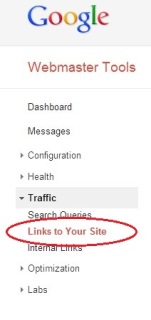
Step 2: To get a list of the back links to your site go to the “Links to Your Site” menu item as shown below.
You can then download all links to a CSV file for easy manipulation and copying.

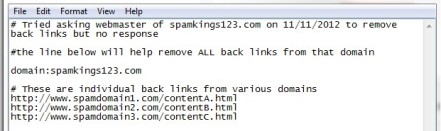
Step 3: Prepare a text file containing the back links you want removed and save it on your computer. See the screenshot below for an example:
You’ll note that Google has allowed for the ability to remove back links using two ways.
One is via the use of the “domain:” prefix followed by the domain name (see first example in figure above). This will remove all back links from the domain without you having to specify each individual link.

Alternatively you can remove links individually from any domain by specifying the link URL as shown in the second example above.

Note that you can also add comments in your file using a “#” symbol.

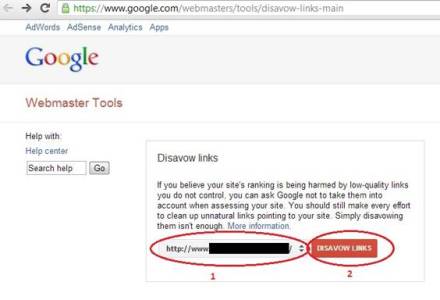
Step 4: Now go to the Disavow Links Tool page and choose the URL of your site and click the “DISAVOW LINKS” button as shown below:

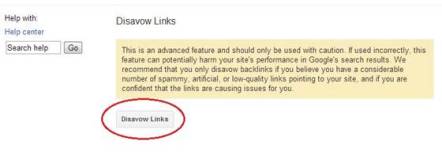
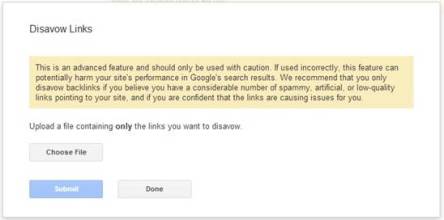
After clicking the button you will be presented with a warning before using the tool as shown below. To proceed simply click the “Disavow Links” button.

Step 5: Now you will prompted to upload the text file you prepared in Step 3.
Upload the file and then click the Submit button.

That’s all there is to it.

Google says that it may take several weeks for the link removal to fully show its effects because your site will need to be re-indexed.


It must be re-stated that you should only use this tool if you know what you are doing because it could have negative effects if not used correctly!

6 Simple Strategies to Get Blog Posts Indexed by Google Quickly

In this article I offer some tips for writing blog posts that are geared up for search engine traffic, and that are written to be shared in the social web. For the example, I will be walking through how I create a real post for a high authority health web site.

I will also be creating a video to embed into the blog post, so I will explain how I created the video, came up with the title for it, and armed it for top results in the search engines.

If following along, be sure that when you create a video and article that they are able to stand alone as you never know how someone will be absorbing your content. It might be that they aren’t watching the video embedded within your post at all, but stand alone on YouTube or wherever it is that you decide to host it.

Video

Watch over my shoulder as I perform the steps that I use to get blog posts and videos indexed by Google quickly

Let’s Use Google Suggest To Find A Good Topic For Our Blog Post

We’ll use the long tail we find within our post title

By default I head to Google.com to start, but if you are writing content for a specific geographic audience like Canada for example, you might want to go to the correct engine (Google.ca) because there will be some differences in the results, even if they are just subtle.

Also, you may want to disable the saving of search history for your Google Account, or log out of Google completely, because the search results may differ for you otherwise. We’ll be looking at top results to do a quick glance at the competition. It’s not a huge deal but it’ll help our testing to be a little more precise, but the truth is we are not dealing with exacts anyway. In case you didn’t know, Google will tailor your results (when search history is being saved), to show sites that you frequent most in the top results.

1) First, let’s decide on roughly what we want to talk about in our post.

In this example I am going to be providing a list and summary of Facebook pages in the “raw food” niche. I’m not sure how many just yet, maybe around 50, but I can work that part out later.

2) Next, let’s head to Google to see what people might be searching for that would like to see that list. There might be some deliberate searches for such a thing, but somehow I don’t think there will be much. Let’s look anyway.

Well, there wasn’t a whole lot.
I did find:

“raw food facebook pages”
“raw food diet facebook”
“raw food health facebook”
“raw food on facebook”

I also discoverd that commonly people might look for Facebook pages in this way:
“{topic-name} related facebook page”
So, even though “raw food related facebook pages” isn’t rolling up, it doesn’t mean it wouldn’t get traffic in the long or short term.

3) Finally, let’s assess the results that come up for each phrase.

For the search “raw food facebook pages” Google lists exactly what you may (or may not) expect. It lists pages on Facebook related to “raw food.”

You might think this removes the need for the content developer but I wouldn’t agree. I think that a nice list with that title will still climb above those results. It would be human edited instead of machine selected after all.

I looked through some of the other terms, and I decided to go for the first one.

What I am mainly looking for when assessing the results is if anyone has used that exact phrase in the title of their content.

While I will be using “raw food facebook pages” for the article, I will probably be using “raw food diet facebook” for the video.

Creating A Blog Post Title Using Our Chosen Google Suggest Keyphrase

Make a title worth clicking and sharing

OK, now with our chosen keyphrase in hand, let’s come up with a title.

The title is arguably the most important part of the content when it comes to getting clicks, SEO, and sharing.

It becomes the starting point, or the “advertisement” for the content piece when the snippet is viewed in the SERPS or after being shared on social sites like Facebook. The title also often determines what is included in other key SEO elements, which include the H1 tag and the URL.

List posts are great, and they are often shared without hesitation.

Knowing that, let’s create a “list post” style title from our chosen keyword.

Let’s go with:

“50 Impactful Raw Food Facebook Pages Worth Liking”

And for the video:

Top 10 SEO Tools and Add-ons for Your Online Business

The phrase SEO tool is an umbrella term that includes any piece of software or service which can:
  • help you improve your website’s visibility
  • build a credible online brand
  • garner strategic and competitive intelligence
  • research keywords and links
  • track social media performance
  • create better content and
  • grow your website
Because of this, SEO tools are an important part of any online entrepreneur’s resource arsenal. Luckily, the internet abounds with dozens upon dozens of SEO tools, covering a wide range of functions.

Below there is a list of 10 of the most popular SEO tools out there, with explanations of how they can assist in your online business.

1. MozBar

mozbar

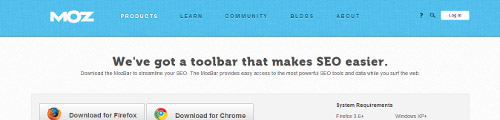
If you are interested in link building, then this is one of the most convenient browser extensions you can get. MozBar lists important SEO metrics for each web page you visit, including domain authority, page authority, on-site HTML elements, and number of backlinks. It also allows you to highlight the types of links you’re interested in (dofollow, nofollow, internal, and external), as well as determine the website’s location, based on its IP address.

All of these features are available with the free version of MozBar. For $99 per month, you can create a standard Moz PRO account, which unlocks access to additional MozBar analytics features, but also to the entire Moz toolkit, including a mentions tool, a rank tracking tool, on-page keyword optimization, a keyword difficulty and SERP analysis tool, and more.

2. Google Analytics

google analytics banneran

Currently, Google Analytics is the Internet’s top rated web analytics and reporting service. For online marketers, it is an invaluable tool that can be used to obtain detailed statistics about a website’s traffic and its sources. This essentially helps publishers understand how visitors are interacting with their website.

Google Analytics can identify where visitors come from, how long they stay on a page, and what country they access the website from. Thanks to its integration with Google AdWords, it can also track conversions; and it’s e-commerce reports can track sales activity.

Blogs and websites may share Google Analytics data with potential advertisers to show how their website is performing and what kind of audience it reaches.

Basic functionality is free, while the premium version can be accessed for an annual fee. Google Analytics Premium offers the chance to work directly with Google and obtain “enterprise-level data.”

3. Copyscape

copyscape banner
CopyScape is an online plagiarism checker and duplicate content detection service that can be quite helpful if your content is being distributed across the web.

Content owners and publishers can use this service to check whether their content has been stolen and republished elsewhere on the web, or whether old content is being repackaged and presented to them as something unique and original. Copyscape functions by matching original content with pages on the internet that contain similar text.

Copyscape also offers two premium services. Starting from $4.95 per month, the Copysentry service monitors your pages and automatically checks for copies once a week, while Copyscape Premium can perform comprehensive plagiarism checkups for only 5c per search.

4. SEER’s SEO Toolbox

seer banner
A free, all-in-one toolbox based on SEER’s own in-house tools and designed to satisfy most SEO needs, SEER Toolbox targets online marketers who lack the technical know-how of seasoned programmers. Consequently, it works with spreadsheets, not programming code, boasting that if you can use the SUM () function, then you’ve got all the knowledge you need to excel (pun intended).

With SEER toolbox, you can easily create mashups, get quick access to relevant data ready for analysis, and better coordinate with your SEO team, since everyone would be using the same tools. The “all-in-one” function allows SEER toolbox to swiftly pull data from varied sources (like Google Analytics, Twitter, SEOMoz, Majestic SEO and more).

5. SEOQuake

seoquake banner

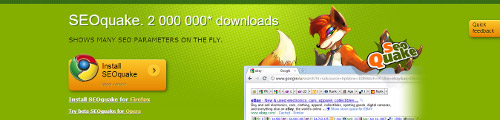
Similar to the MozBar, SEOQuake is a free analytics browser extension with over 2 million downloads. Versions exist for Firefox, Chrome, Opera and Safari.

Praised for the massive amounts of “raw data” it can deliver (more than any other SEO toolbar available), SEOQuake keeps track of all manner of relevant parameters, including Google Page Rank, Google Index, Google Search information, Google Links (plus similar data for other popular search engines), Alexa rank, keyword density, domain IP and page source, but it also allows users to easily create their own parameters.

With so many features and things to track, SEOQuake is great tool to help you get a sense of how popular or useful a website is, often in a single glance. If you’re a beginner, this toolbar is a great place to start teaching yourself some SEO basics.

6. Klout

klout banner

This quirky app resorts to social media analytics to evaluate its users and measure their online social influence. The app then assigns a numerical value to that influence, called a “Klout score.”

Klout draws data from Twitter, Facebook, Google+, LinkedIn, Foursquare, Wikipedia and Instagram to measure the size of a user’s social media circle, as well as their ability to drive action via the content they create.

It takes into account metrics such as retweets, follower counts, likes, subscriptions and memberships, and uses them to calculate social “outreach.” As a SEO tool, Klout can be used to measure your social media presence, and to better understand how your audience is responding to your content.

Although it is growing in popularity, Klout has also been criticized for producing “Klout scores” which can’t accurately represent one’s social influence. A famous example shows that according to Klout, US president Barrack Obama is less influential than a number of bloggers.

7. Ahrefs

ahref banner

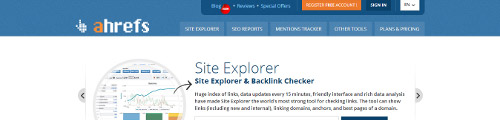
Primarily useful for link research and link building, Ahrefs comes with a large index of links, detailed anchor text distribution charts, and a user friendly interface to boot. The tool updates every 15 minutes, and can show backlinks, domains, and the best pages of a domain.

Ahrefs can generate SEO reports that can help you spot mistakes in titles, headers, meta descriptions or meta keywords; or find broken pages and duplicate content. A mentions tracker allows you to keep an eye on mentions of your brand or other relevant terms.

While this is mostly a paid tool, some limited functionality is offered for free (mostly as a free trial). Three paid subscription levels are available: for a monthly fee of $79, the Professional package can check up to 5000 backlinks per request; for $179, the Elite package ramps that number up to 15,000; and for $499 per month, users can gain access to an enterprise-tier package which displays a whopping 30,000 links per request.

8. Majestic SEO

majestic seo banner

Majestic SEO is known for having one of the largest link intelligence databases on the web, which makes it a great option for anyone interested in online marketing and PR.

It offers a suite of useful competitive intelligence tools: a Site Explorer which provides URL/domain summary data, a keyword checker, a backlink history tool that shows the number of backlinks for a URL or domain, webmaster tools to verify the ownership of your domain, a wide range of standard and advanced reports, and much more.

Free services are offered to individual users who want to get data for the sites they own. Silver, Gold, and Platinum subscription levels are marketed toward SEO professionals and SEO agencies, starting from $29.99 per month, or $299.90 per year.

9. Social Crawlytics

social crawlytics banner

This is a nice competitive research web-based tool that can help you keep track of your competitors’ most shared content. It can quickly scan URLs to show you where your competitors’ content is being shared and promoted, and then compile useful social sharing metrics. Its intuitive dashboard makes it very easy to monitor, schedule and analyze those metrics.

Since this tool is free, you can jump right into using it if you have a Twitter handle and a URL to search. After you’ve tweaked the parameters of your search, all you have to do is provide an email address and Social Crawlytics will send you the report once it is compiled.

One of the most interesting features of the Social Crawlytics report is the Sunburst data graph, which “gives you a great visual view of how your shares are split up when approaching from a search engine’s point of view.”

10. Raven Tools

raventools banner

This popular suite offers a classic lineup of SEO, content and research tools. Raven addresses four main areas of interest for online entrepreneurs, namely SEO, social media management, content marketing, and PPC management.

If you’re confused about the myriad of SEO toolkits out there, Raven is a great place to start because it offers a lot of features in one place. Its SEO toolset alone contains over a dozen great resources.
For example, it features two time-saving tools: Site Finder – which uses Bing data to quickly identify the best linking opportunities, and Backlink Explorer – which pulls out all the backlinks for a URL or domain (including nofollow links) and compiles a comprehensive report.

But this is just a fraction of what the Raven software can do. However, quality comes at a cost. While a 30-day trial is offered for free, for $99 per month, you get unlimited access to the entire Raven tools suite. A nice perk about this offer is that the price covers up to four users, each with unique login credentials, which makes Raven a good choice for a small SEO team.

Monday, 13 October 2014

13 Best Ways To Build High Quality Backlinks For Blog

If your blog is successful then you must be knowing the importance of building high quality backlinks, To build high quality backlinks for blog or website you have to get backlinks from high page rank blogs and websites 


Backlinks play a very important role in increasing your blog SEO and search engine rankings,You can get 1000's of free backlinks from many free websites but those backlinks will not help in your blog SEO and search engine rankings because those links are mostly from Stats Links websites below is post I have written earlier which will give you an idea from building backlinks from free websites

Must Read- Reality Of Getting High Quality BackLinks For Blog-Backlinks Strategies Tips


Best Ways To Build High Quality Backlinks For Websites
[Pin on Pinterest]
Ways To Build High Quality Backlinks For Websites
Since Google release Penguin and Panda updates many blogs and websites got seriously affected in terms of their blog SEO and Google rankings So this post will be helpful to recover from penguin and panda updates by showing you how to build high quality backlinks


Now a days every blogger who want to get high search engine ranking(Google rankings) are trying to build high quality backlinks it's like treasure mine for their blogs/websites which yields in greater search engine ranking


Must Read- 13 Top Benefits of Interlinking Your Blog Posts For Better SEO Results


Mostly the backlinks we get from websites are generally no-follow links which is not much beneficial because earlier many webmasters used black hat link building techniques for SEO, So now it very hard to get do follow backlinks for your blog/website So I am presenting you with 13 Best ways to build high quality backlinks for your websites

Read- 11 Hidden Benefits Of Interlinking Your Old Blog Posts

Its not useful to get 1000 backlinks from low page rank website then to just get 10 high quality backlinks from high page rank websites So below are top 13 high page rank websites to get backlinks from free


13 Best Ways To Build High Quality Backlinks For Blog/websites


1) Youtube.com- You must be knowing that millions of people visit youtube to watch their favourite videos and youtube is high page rank website PR9 and ofcourse it Google product and having a backlink pointing to your blog or website will boost your blog SEO and Search engine rankings


Just visit youtube.com and create your profile channel and put your blog url in link sections which points back to your blog or website


2) Google Plus- Create google plus account for yourself and under link section you can add your website links More you can also create google plus pages for your blog and this will immensely help your blog SEO and Google ranking


Many time I have seen that when I do a blog post and share it on google plus pages these pages show very quickly in search engine results because Google plus is High page rank webiste and it great to build backlinks for your blog or website through google plus


3) Facebook.com- Every body now uses facebook so go ahead and create facebook fanpage for you blog, Facebook pages can rank very high in search enigne results and you can build high quality backlinks for your blog/website which will help in SEO also To create a facebook fan page simply go to facebook and click on create page


4) Squidoo.com- If you want to get high quality backlinks for blog then squidoo is the place you want your blog to be, You can get high quality backlinks for your blog by submitting quality content  You can submit articles by creating lens which will also increase your blog traffic and you will get high pagerank backlinks


5) Hubpages.com- Another really very great website to build backlinks for website, Hubpages website is similar to squidoo where you can submit articles remember submit unique articles and don't use spun articles because you article will not be accepted if it looks like spammy


6) Twitter.com- Twitter is most famous microblogging website in world and if you want to get high quality backlink then you can create a free twitter account, Just visit twitter and create a twitter profile and add links to your blog For More Benefit and traffic create profile for your blog rather than creating personal twitter profile and twitter is very high page rank website


7) Digg.com- Digg is one of the famous social bookmarking website in world you can submit articles to digg which will point back to your blog It will also help in increasing traffic to your blog
Try to get more diggs the more digg you get for your articles the traffic will be more for your blog, Digg is one of the best ways to build backlinks for your blog or website


8) Stumbleupon.com- Stumbleupon is very famous article sharing websites and you can get quality linkbacks to your blog, Target your main keywords in profile and descriptions for better results


9) Ezinearticles.com- Very famous article submission directory, you can create unique articles and submit to ezine and you will get quality backlinks for your blog  Try to submit unique articles and you can significantly increase your blog traffic and SEO


10) Reddit.com- Reddit is also very well know article submission website and it great place to build quality backlink for your blog Simply put links and anchor text which points to your blog or websites


11) LinkedIn.com- Create a company profile for your blog and put links to your websites, you can also create personal profile its best to have both which will get you high quality backlinks for your blog and will definately help to increase traffic


12) Yahoo Listings- No matter you have local business or not simply list your blog by choosing suitable category and try to include links to your website As you might know yahoo is very popular website so if you can get backlinks from yahoo listing will definitely increase your google rankings


13) Yelp.com- You can create a profile on Yelp. The link in your profile is followed. Links and you will get high quality backlink for your blog


So these were 13 best ways to build high quality backlinks for your blog/websites and don't waste time in building backlinks with no-follow link websites just refer to all the above websites and create profiles and use targeted keywords in your profile and description which will further explore your blog to wider audience and it's also great for SEO
- See more at: http://www.nicebloggingtips.com/2014/04/ways-to-build-high-quality-backlinks.html#sthash.dLTXSRsT.dpuf

How to Create Sneeze Page For Your Blog

What is Sneeze page- A Sneeze page is a page on your blog with highlights your previously written posts and enforce your readers to dig deep within your blog posts


Why Sneeze page is important?

There are many blogs out there with hugh archives with literally hundreds of thousands of blog posts and blog is arranged is chronological order which means your latest posts come over your older posts on home page and once older post gets off the home page there are very few chances that your blog readers will explore your best blog posts which you have written previously


Create Sneeze Page For Traffic
[Pin on Pinterest]
Create Sneeze Page For Traffic

So here sneeze pages comes into actions it explore your previously written amazing posts with might be sinking in your archives, I know how much time it takes lots of time to  craft a blog post and if no one is reading your blog post then what’s the use of writing so sneeze page helps to promote those blog posts


How to create Sneeze page for your blog


1) If you have a tutorial blog then you can create sneeze pages like

a. Blogging Tips for Beginners
b. Search Engine Optimization For Beginners
    c. Affiliate Marketing For Beginners
    d. How to earn money form Google Adsense


2) Series Post- You can also create a series of blog posts like giving them step by step instructions on how to do certain things but make sure to interlink your series of posts either by providing recommended links and suggestions


3) You can simple create a blog posts about the Best of 2014 on “Your Blog Name” and list all the previous best posts you have posted in 2014 especially if you have been blogging since few months


4) One tip to create amazing sneeze page which can drive lots of page views for your blog is pick a broad topic in your niche and start creating blog posts on subtopics and put all those small blog posts into your sneeze pages


5) Sneeze pages can drive lots of page views if you put your sneeze pages at hot spots of your blog like in navigation menu, sidebars and recommended links sections of your blog


6) If you can make a new visitor to read 10 blog posts on your blog then chances are good that they might become loyal readers or subscribe to your blog and sneeze pages help to accomplish this task


7) Creating a sneeze page for your blog is not that much difficult just you have to think out of box and think of the possibilities how you can explore your older posts by putting them in sneeze pages


8) If you don’t know which posts I must put on sneeze page then you can refer to your blog stats which posts are getting more hits and views  I prefer using Google analytics for stats


9) Even now if you are confused on how to create sneeze page if I don’t have enough blog posts then don’t worry simple create blog post like “12 Tips that will drive more traffic to your blog posts”


So if you don’t have a sneeze page for your blog go and create one because it more useful than any other pages for your blog
Sneeze pages can help you in getting most trust and loyal readers by referring them to useful blog posts from your archives - See more at: http://www.nicebloggingtips.com/2014/02/create-sneeze-page.html#sthash.cpODHR2o.dpuf