Thursday, 7 May 2015

How To Boost Your Ecommerce Sales With Effective Twitter Marketing

Twitter is any marketer’s dream platform. With more than 284 million active monthly users and a monthly volume of more than 500 million Tweets, Twitter allows businesses of every size to monitor their target customers closely, engage them regularly and drive more sales.

For e-commerce businesses though, Twitter is a gold mine. If you know how to use this platform to your advantage, you can convert it into a major revenue generation channel for your e-commerce business. It’s not just about knowing the features that Twitter offers. It’s more about using those features to drive business value. And this is what I am going to tell you in this post.

1. Understand the Platform and Your Objective

Before diving deep, understand how Twitter can contribute to your business. Twitter is a fast moving micro blogging platform. It has given voice to common men and women around the world, who actively use it to engage with their friends, celebrities and their favorite brands.
It is not primarily an ecommerce platform, and people do not come here to buy and sell products. To take advantage of this powerful tool, you need to learn the rules of the game. Instead of trying to sell products all the time, you need to join conversations, build relationships, establish trust and then drive sales.
Don’t expect immediate results from it. It won’t open floodgates of revenue and traffic immediately. But once you establish yourself on it, and earn the trust of your followers, things will start happening.

2. Build a Strong Brand Image With Your Profile

Your objective on Twitter is to make sales. For this you need to establish trust by building a strong brand image. Your Twitter profile is a great place to start your branding activities.
  • Twitter Handle: Use your company name. If it’s not available, add a number at the end. But try to keep it simple and easy to remember.
  • Profile Picture: Use your company’s logo as the profile picture.
  • Header Image: Use an image of your team or your office building as the header image. In this virtual space, showing your physical existence can really help you stand out. If you don’t have a physical existence, use an image that reflects your business.
  • Bio: Twitter gives you 160 characters to describe yourself/your business. Use this space wisely. Without being too fancy, describe in clear words what your business is all about. Use the keywords that resonate with your target audience. For example, here’s how KitchenAid, a leading kitchenware portal, describe their profile.

    example-of-using-twitter-bio
  • Location: For e-commerce websites, location often matters. So mention it clearly on your profile.

 3. Enable Twitter Cards For Product Pages

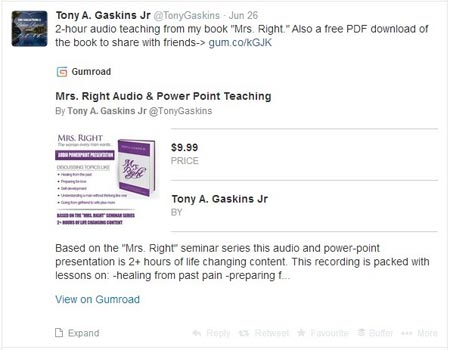
Twitter cards is a powerful Twitter feature that really comes handy for ecommerce websites. If enabled on your website, Twitter cards will show additional information when someone Tweets your product pages. The standard Tweets are limited to 140 characters, but Twitter cards expand that limit by showing a snippet of your product page that includes the product price and quantity in stock. This will simplify the buying process for your buyers and increase the probability of making sales.
twitter-cards-example

4. Attract Followers the Smart Way

Once you have the basics in place, you should focus on attracting relevant followers. Target people who shop online and who’re likely to purchase from your ecommerce website.
Avoid two mistakes,
a) Don’t buy followers from any Twitter marketing company. They’re mostly inactive followers who are of no use.
b) Don’t mass follow people in the hope of getting follow-backs. This will hurt your brand image.
Instead focus on the following activities.
  • Become a knowledge source: Accounts that share high quality and actionable Tweets regularly, attract followers naturally. Make sure your Tweets serve a purpose. Make them actionable. Share tips, advice and best practices. Become the go-to account for everything related to your niche.
  • Target your competitors’ followers: Your competitors’ followers are the best place to start. Attracr them to your profile by engaging with them. Go through your competitors’ profiles and see if there are any unanswered Tweets or questions that you can answer. Enter your competitor’s name in Twitter search and see what people are saying about them. Respond to their Tweets to let them know you are a better option.
  • Cross-network promotion: Route people from your Facebook, Google+, LinkedIn and other social media profiles to your Twitter account. Do this by adding your Twitter handle in all your introductions and by regularly posting about it on different platforms.
  • Market with guest blogging: Guest blogging is a great way to attract followers. Target the top blogs in your niche and offer them high quality guest posts. Add your Twitter handle in the author bio and ask people to follow.
  • Influencer outreach: Follow the top influencers in your niche (people who’re regarded as experts). Respond to their Tweets and try engaging them. The more you engage with influencers, the more exposure you’ll get.
  • Acknowledge RTs: When you get ReTweets, favorite them as an acknowledgement and send a small thank you message in reply. This will help you win more followers.
  • Twitter Chats: You can host Twitter chats on different topics of your niche to boost engagement. Choose a hashtag, for example #kitchentalk, and ask all your followers to Tweet with this hashtag. Hosting Twitter chats can be fun, and can win you lots of new followers.

5. Structure Your Tweets for Maximum Engagement

Each Tweet has only 140 characters, but it still involves a lot of science in driving engagement (ReTweets, Replies, and Favorites) on Twitter. The structure of your Tweets is crucial for your chances to attract new followers. Here are a few things you should keep in mind.
Note: The stats used below are based on a research by Dan Zarella, a social media scientist at HubSpot.
  • Tweet Length: Tweets between 110 and 115 characters attract the highest engagement and RTs.
  • Link Placement: If your Tweets have links, place them near the start of the Tweet. An analysis of around 20,000 revealed that Tweets containing a link in the first 50 characters attracted more RTs and a higher click through rate (CTR)
  • Hashtags: Tweets with hashtags get 55% more RTs. Use up to 3 hashtags with every Tweet.
  • Quotes: Tweets with quotation marks get 30% more RTs.
  • Images and Vines: Tweets with images and visual content get almost 200% more RTs.
  • Tweet Timing: Tweets between 9AM – 6PM get the highest engagement on weekdays.
  • Mentions: When tagging someone in a Tweet, make sure the Tweet does not start with a Twitter handle. Otherwise only the tagged person will be able to see it.

6. Track Your Performance With Twitter Analytics

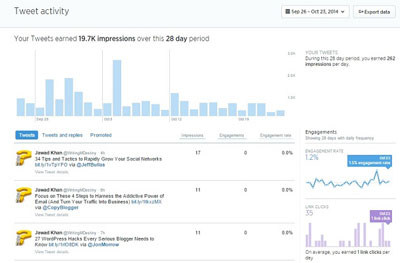
Twitter analytics is a relatively new feature. But it gives you great insights on your Tweets and engagement levels. It shows you a timeline of your previous Tweets highlighting the Tweets that attracted the highest engagement and the users who showed the most interest in your content. Looking at these stats, you can make changes to your Tweet structure and content mix.
https://www.tipsandtricks-hq.com/wp-content/uploads/2014/12/twitter-analytics-and-stats-example.jpg
You can see your detailed account analytics from your profile menu.

7. Encourage Sharing on Your Website

You need to make it as easy as possible for your website visitors to share your products and website pages on Twitter. You can do this by:
  • Adding social media sharing buttons on your product pages. You can use services like AddThis or DiggDigg to embed sharing buttons.
  • Add a statement like “Share with your friends” or “Sharing is Caring!” with your social media buttons. Simply asking your visitors can also increase your sharing numbers.
  • Add a Twitter follow button on your website.

8. Use Twitter Lists to Monitor Your Target Audience

Twitter Lists is another feature that can help you target your customers much more effectively. Twitter is a noisy place and it can be very hard to focus on your target customers with so many people Tweeting at the same time.
With this feature, you can add specific people to a Twitter list and monitor them in isolation. You will only see the Tweets of the list members. This will cut the noise and help you focus on your target users.

Conclusion

Making e-commerce sales on Twitter requires a long term strategy. It’s not a quick process, but if you focus on engaging your followers, and attract new followers, by sharing highly actionable Tweets, people will gradually start trusting you as a credible brand. This is when you can promote your products and drive more sales.

How to Get the Most Out of Google AdWords For 2015

Some would say if you’re just now looking to best practices for 2015, then you’re behind the trend and behind your competition. But it’s better late than never. Who knows? Maybe your competitors are just as busy as you and haven’t found time to get up to speed with online marketing. I run into it all the time. Here is your chance to make a New Year’s Resolution and get even better with Google AdWords. So what are the best practices for Google AdWords in 2015? Let’s dig into it.

What Should I Spend?

How successful do you want to be? Have you heard the phrase – you get more of what you focus on? The amount of money you are willing to invest in your AdWords campaign is a key factor of what you can expect to receive. I am going out on a limb here and will say that any campaign that is under $100 per day is a waste of effort. I’ve seen people start campaigns on $20 – even $50 per day and not get sufficient clicks to provide actionable data or conversions. With small budgets, one can quickly see their ROI decrease. And of course, if you aren’t getting the results you think that you should be getting, who do ya blame? It’s not the cheapskate who wanted to get big returns from a small budget. Having a small budget can be like having a beautiful Ferrari F4 and giving it only a quarter tank of gas. You won’t go very far.

How Do I Build a Campaign?

Each campaign should have it’s own budget. When do you create a new campaign? A good rule of thumb is to separate AdWords campaigns by geography. If you have different cities or even states where you are promoting different local branches or retail outlets, etc. it makes sense to differentiate ads campaigns between each store. You will also want to have a separate search only campaign and a display only campaign and if you want to perform re-marketing, then you guessed it; you will want a separate campaign for that as well. The reason for the separate campaigns is because each of these types of marketing behave differently.

How do I Build an Adgroup?

If you haven’t figured this out yet, Google rewards relevant content. A best practice is to create Adgroups with tightly themed subjects just like you would organize your brick and mortar store. So for example: a campaign would be Shoes and the adgroups would be men’s shoes, women shoes, children shoes, etc. Assess the spend of each individual ad group within each campaign. Within each Adgroup have at least 3 ads; one using dynamic keyword insertion, another using a question and all of them using at least one keyword from your keyword list and with a strong call to action, other than call now or click here. These calls to action are too obvious and Google doesn’t like it and thus penalized advertisers who use these.

Get Dynamic

In September of 2014, AdWords launched the most impactful update for e-commerce advertisers since the release of Dynamic Remarketing. This update was the release of ad customizers, which allow advertisers to add dynamic content to their text ads. This dynamic content can be anything from inventory or price to a countdown until a specific event. This works very well if you have thousands of products that constantly change. Give Google a datafeed of all your product information and set bids based upon information contained within that feed. With dynamic search ads, Google grabs the information it needs from your site and you target audiences based upon that information. Much like with Google Shopping, make sure you begin with an ad group targeting “All web pages” and set your bids low here. A low bid is important because it stops DSAs from stealing traffic from existing search campaigns (something you really want to avoid). The last thing you want to do is compete against your your own ads. Naturally it also makes sense to take every opportunity to use ad extensions such as call, call out, location, social, review and site extensions. These give your ads more creativity and differentiate your ads from the sea of sameness seen on the SERPs.

Get Shopping Campaigns

If you have products to sell, you NEED to take full advantage of Shopping Campaigns, formerly known as Product Listing Ads (PLA). These ads can outperform text search ads because they show the image of the exact product a shopper is looking for at the time they are ready to buy. Simply create a data feed with every piece of product information to display with the product listing including a good quality image so shoppers see exactly what they will be buying. This is still an under utilized Google product and can make a positive impact for your overall campaigns in 2015.

Managing Keywords

I’ve written about keywords in another article so I won’t go into as much detail here. As you develop your keywords and keep them tightly related to the adgroups you will quickly determine which terms are generating clicks and converting visitors to customers. As your campaign accumulates data, you will zero in on the keywords driving the strongest ROAS, or, Return on Ad Spend. Using the keyword reports, you will be able to identify and expand upon these top performing keywords with like-terms. At the same time, you will pause or delete keywords that are under performing. You will also determine which keywords are driving traffic which are irrelevant and need to be added to the negative keyword list.
Since Google got rid of exact match types in 2014, you no longer need to build exhaustive lists of plurals and misspellings. AdWords now performs that with broad match automatically. Google points out that “close keyword variations receive an average of 7 percent more exact and phrase match clicks with comparable click-through and conversion rates.”

What About Bid Management?

Closely linked to your spend are your ad and keyword bids. Naturally you want to have your ad show within the first 3 ad placements available, on average. Ads showing up in the #4 spot or lower is a strong signal that the ads need to be changed or the bid needs to be increased. You can tell by looking at the 1st page suggested bid column. If your ads or keywords are under performing due to constrained budget, Google will show that in the status column. I like to be in the 1 – 2 spot and bid accordingly. You can manage bids with the ads as well as keywords.
You can also add bid modifiers for location and device. You can increase the bids by a certain amount and Google will use that bid for the auction. This is helpful to win placements for searches on mobile devices or for users close to your store and bring them in to buy. You can also decrease bids in the same fashion. Let’s say you want to decrease bids as people are further from your store so the ads only show for relevant audiences within a certain radius from your location, you would place a location bid modifier on the ad.

Testing

ABT – Always Be Testing. Marketing is about continuous testing. Give a campaign at least 3 months before calling it a failure. Create a campaign with at least 3 adgroups and 3 ads per adgroup and 7-8 keywords per adgroup. This allows you to manage the campaign and test the separate components such as the headline and description lines as well as the keywords. Start small with changing one item at a time and tweaking as needed.
These are the best practices (As I see it) for getting even better results with AdWords for 2015. If you disagree I’d love to read your comments below.

Your Top Tips For The One Person Marketing Department

Regardless of what the economy is doing, Any CEO’s worth their salt are always looking for ways to get more value for their dollar and strengthen the bottom line. If your company has been burned by the 20 something that you hired because they were a friend of the family or they sounded smarter than you in regards to marketing or whatever the case, you may have spent way more money on a website and SEO/SEM and social media than are willing to admit in public.
I can understand your reluctance to try anyone or anything new. It reminds me of a story.
Once upon a time, (all good stories start with once upon a time, right) a very successful man owned a construction company. His workers though, used rope and mud and straw and rocks to build the buildings. Then one day the business owner’s good friend came to lunch and and told him that he had a tool box filled with new tools and and with these tools, he could help his workers build better and the word would get out about how great their construction company is and people would come from all over the lands to do business with them and it would be so much easier for the employees who are doing the building. Well, the owner agreed to this idea and paid his friend very well. After all, things are going well, and if his friend can help him grow his business even larger with these tools, then it’s worth a try. The owner didn’t understand the tools or how they worked. His friend seemed to know what he was talking about though. After a few years, the employees started to complain about the owner’s friend. They said his tools didn’t work and he didn’t even know how to use them. The owner was in a bad spot. This was his friend after all! He was also losing money though and, nothing to show for his investment in his friend or these new and fancy tools that were supposed to grow his business.
The two men fell into conflict. It was the first serious rift in 40 years of friendship side by side, sharing meals, drinks, and trading labor and goods as needed without a hitch.
Then the long collaboration fell apart.
One morning there was a knock on the business owner’s door. He opened it to find a man with a carpenter’s toolbox. “I’m looking for a few days work” he said.
“Perhaps you would have a few small jobs here and there. Could I help you? I have several years of experience and references…”
“NO,” said the business owner. “I trusted one person and they failed me. I tried a lot of different things that he said to try and nothing worked. I won’t waste any more money on someone else telling me about how they can grow my business or make my employees jobs easier!”
The carpenter said, “I think I understand the situation. If you give me an opportunity, I will guarantee my work. If I don’t bring value that you can measure and see with your own eyes, You can fire me and not pay me.”
The carpenter worked hard all that day measuring, sawing, nailing and showing the other employees and word began to spread around the town.
About six months later, the carpenter had just finished his job on the new building using the new tools and techniques. The business owner’s eyes opened wide, his jaw dropped.
“You are quite a fellow to build this building after I told you I didn’t trust you and didn’t want to try your tools,” said the business owner.
Word spread about the company and how their buildings were better than anyone else’s and people were traveling from all over to do business with the company…
“How were you able to do so much with the same tools as my old friend where he wasn’t?”
“It’s one thing to have the tools and techniques. It’s quite another to know how to use them,” said the carpenter.
So, the point of the story is not all tactics or campaigns will work all the time. Not every self-proclaimed marketing expert is in fact one who delivers results. Don’t quit all marketing and advertising just because it didn’t work one time.
Here is what the one man marketing expert should be doing:
  • Marketing plan
    • This goes without saying yet is still rarely done. Start with a plan and execute the plan and make adjustments along the way.
  • Media/design style guide
    • Without this, the brand identity is unfocussed and sloppy.
  • strategy and daily checklist for social media across all channels such as
    – Facebook, LinkedIn, Twitter, Youtube, Google+, Pinterest
    • This checklist allows the management of priorities.
  • Gain free PR through journalists on twitter
    • These are easily found and many journalists are accessable.
  • Register with online directories
  • Get online reviews from your customers on social media sites
    – Facebook, LinkedIn, Google+, Yelp, Manta, BBB, Yahoo Local, Bing, Foursquare, Kudzu, Localeze and Google Trusted Seller Rating / Review sites
  • Add regular content with best keywords for your business to you website for SEO
  • Have your website tell your story
    – Engage your target audience with why their life will be better with you in it.
  • Place targeted ads on targeted sites (b2b or b2c)
  • Make ads with a call to action and reward for taking the action
Use the above tactics as part of a larger strategy to create raving fans and reward them for telling your story for you
When you’re a solopreneur or a very small business owner or the only person in the small business marketing department, time availability is extremely constrained. Regardless of the situation, time remains to be the most valuable and limited resource and managing priorities are an invaluable skill. I know I definitely don’t like getting sucked into a task that I think will only take a couple minutes and that was 3 hours ago. Has that ever happened to you? Like checking email or updating a social media status for the business. These activities are time drainers or black holes.
To minimize that from occurring, I like to focus the majority of my time on MMA (Money Making Activities). It can be a challenge at first, yet as you practice managing and scheduling priorities which contribute to the bottomline, the better you will get it and the easier it will be because you are becoming a person who naturally focuses on MMA like calling on clients and potential clients and serving the clients.
There is a saying: You’re either working on your business or working in it. Obviously, you want to develop systems that create efficiencies and better use of time as your business grows so you can eventually hire others to assist in the marketing activities. Here are the Top 3 action items that I highly recommend you take away from this article:
  1. Make a list of outcomes and work backward to determine required benchmarks and timeframes.
  2. Block out on your Google Calendar the daily priorities, even lunch and stick to it.
  3. Find inexpensive virtual assistants or outside talent to handle as much as you can budget. This will take some vetting above and beyond reading their reviews. You may have to try several people out before finding a successful fit.
This should be a fair start. I look forward to reading feedback from my fellow marketers.

How to Select Keywords For Google AdWords

Few weeks ago I wrote an article on getting the most out of your Adwords account. In this article I will share some tips on how to select keywords for Adwords.
A good place to start with search engine marketing (SEM) is the use of keywords because that is how your customers find you, right?
If there is anything that you remember from this article, remember these 3 things:
  • Think holistically about the different ways that customers could reach you
  • Align your keywords and their management with your overall business outcomes
  • Delete your low search volume keywords
There are a few ways to develop a list of keywords for your AdWords campaign. Think of the words on the website, your services and products that you offer. What terms do you think your customers use to describe or search for you? What terms do your competitors use to be found?
Remember the story of the 3 bears? Goldilocks tried the porridge and one was too hot and another was too cold and one was juuust right. Well, you can think of keywords for AdWords in the same way. Some are too broad and some are too long and some are juuust right. In SEO, we LOVE Long Tail keywords because those are very relevant. They may not be searched as much as a broad term, but when they are, its money in the bank.  Unfortunately, you can’t have a lot of long tail keywords in AdWords because of the low search volume. Compared to shorter keywords (those with two to four words), keywords that contain five words or more drive less than half the volume of clicks and impressions on average. It also hurts your quality score. I’ll explain this a little later.
Let’s say you are David Bouley, the owner and chef of Bouley’s French Restaurant in New York City and you want to have a campaign to sell more gift certificates to your restaurant. Using the term Gift Card is too broad because it will trigger all kind of searches that are irrelevant. He doesn’t want people seeing his ads when searching for Harry & David Gift Baskets. Using Restaurant Gift Certificates is a little better because it triggers those searching for that more specific gift certificate, yet it can still be a problem because it can show up for Olive Garden gift certificate, or Chili’s, which target totally different diners with a different price and dining experience expectation in mind. A good keyword phrase could be french fine dining gift card or french fine dining gift certificate. This targets diners who are interested in a French Fine Dining Experience. Another possibility could be Bouley’s Gift Certificates, however I bet the search volume would be very low.

Keyword Tools

There are many software tools available to assist you in finding the best keywords for your campaign or website. One of them is the Google Keyword Planner. What I have found though, is that these tools are not as accurate as you may think. The search volume has been off and the bids weren’t as accurate as what I saw when my campaigns went live.
I was told once by a very successful online marketing professional, Matt Trainer, who has made a good living by helping major brands with getting massive targeted traffic and customers into their sales funnels, to take 10 – 15 minutes and step away from the computer and actually think how I, as a potential client would search for that product or service. I’m sure you can think of the right terms just as well as any software can. Heck, you can even think of what terms your competitors are using. Like many things in life, you just gotta take action and step out in faith. Give it a try yourself and, you may start to realize that this practice will work better for you too if you try it and practice it. Maybe you have already seen the same things that I have experienced.

Grouping Keywords

Google LOVES tightly themed, related and relevant content. You want to match keywords to a user’s search terms and to the ads as well as the landing page you are sending them to visit. I arrange keywords within the adgroups. It also makes it easier for you to manage and maintain your account.  If you are on a tight budget, keywords are often grouped at the campaign level for greater budgetary control.

Stay Clear of Low Searched Keywords

Watch out for low search volume keywords. As Stated earlier, SEM doesn’t like long tail keywords. These terms often haven’t driven a single impression in months or even years because people aren’t performing searches on them (not because your bid isn’t winning any auctions). While you want them on your page for SEO, Delete them in SEM campaign if you have other keywords that could potentially cover that traffic. My personal preference is to have 2 – 3 long tail keywords that are super relevant even though they don’t perform well because when people do search for example: Buy Bouley’s NYC Gift Certificates, His ad will show up and the person looking for that and ready to buy a $500 gift certificate for a 5 course French Fine Dining luxury experience will have found exactly what they want.

Let’s Get Negative

Just as important as the keywords people use to find you; Negative keywords are an essential part of a well-rounded keyword strategy. In order to increase the profitability and improve control over the flow of traffic in your account, use negative keywords to the fullest. On the most basic level, negative keywords prevent you from showing ads to people who are less interested in what you have to offer, even though their queries may be syntactically related to the keywords in your account.
So, let’s go back to the example of David Bouley’s French Restaurant. He doesn’t want to show up for searches of gift cards from Pizza Hut, or Chili’s or Applebee’s, etc. So a sure fire way to assure we are targeting the most relevant audience is to add these restaurants to the negative keyword list along with gift baskets and Harry. Once the campaign is running, you will see in the keyword details reports what terms are triggering your ads and then you can add the appropriate ones to the negative keyword list.
Having a strong negative keyword list will be valuable as it improves the performance of your campaign and improves the quality scores of your ads.

Scoring High Marks on Quality

You know how you have those warning or indicator lights on the dash of your car? They turn on when you need to check your engine, or if your oil or gas is running low? Well, you can think of the Quality Score of your keywords as a warning light: something that alerts you to potential problems which need to be checked. A lot of advertisers spend a lot of time on this. A good rule of thumb I go by is a score under 6 is a stronger indicator that I need to check the relevance of the term and how it’s performing and if I need to tweak my landing page or ad or both.
Attempting to use tricks, shortcuts or short-term solutions to force the quality score up isn’t the way to go. Rather, you’re better off to focus on your long-term performance outcomes and look for ways to reach them by improving your user experience. Google is ALL about the user experience and so should you.
That should be enough for now to get ya started. I’d love to read your thoughts on this.

7 Ways You Can Use Google Analytics To Power Your Marketing Efforts

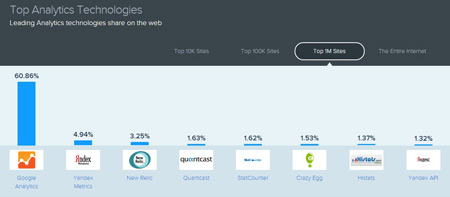
Google Analytics is the world’s most popular web analytics application, used by almost every other webmaster. According to SimilarTech, almost 61% of the top 1 million websites (Alexa rankings) use Google Analytics.
top-web-analytics-technologies-comparison
However, most webmasters don’t use Google Analytics to its full potential. Studies indicate that almost 80% of ecommerce retailers use Google Analytics incorrectly. Viewing daily traffic stats, page views and traffic sources is a very basic way of using Google Analytics.
As a webmaster, you can use it in a much more advanced manner and derive extremely useful insights that can be used to fine tune your traffic strategy and marketing campaigns.
In this post, I’ll discuss a few ways you can use the information generated by Google Analytics to improve your website’s content, fine tune your SEO structure and generate more traffic.

1) Increase Organic Traffic with SEO Queries and Landing Page Reports

One of the main objectives of tracking your website analytics is to identify loopholes and find ways to attract more traffic. In Google Analytics, you can do this monitoring the SEO queries and Landing Page reports.
But you first need to integrate your Google Analytics account with your Google Webmaster Tools account. Once both these tools are integrated, you can see the top performing SEO queries for your website that are getting the highest impressions on search engines.
Here’s what you should do.
  • Use the SEO report within Google Analytics to see keyword ranking, clicks and impressions for your website.
  • Sort the keyword list by the number of impressions, and look for the highest impression keywords.
  • These are keywords for which you are already ranking well on Google search. You just need to improve the click through rate (CTR) for these keywords to increase your traffic.
To improve the CTR of these high impression keywords,
  • Keep your page and post titles around 55 characters, and meta descriptions around 156 characters.
  • Understand the context in which people search your high impression keywords, and then create content that is useful for those people. Create your content with the user’s intentions in mind and focus on benefit driven copy.

2) Increase Traffic With Keyword Report

To increase your website’s traffic by using the right keywords in your content, you can use the keyword report in Google Analytics. To access this report, go to Traffic SourcesàKeyword Report.
Here’s you can find the top keywords that are driving traffic to your blog. If you focus on just the top 10 keywords bringing in the highest traffic, here’s how you can use them.
  • Use them as alternate tags in the images on your website.
  • Also use these keywords in the titles of the images on your website.
  • Use the same high traffic keyword in your page title and description.
  • Make these keywords a part of the anchor text of your internal website links. But make sure your keyword based anchors include other natural words as well. For example, instead of using the keyword “WordPress Themes” as anchor text, use “Here are some of the best WordPress Themes” as anchor text. This seems more natural.
Create more blog content using your high traffic keywords.

3) Drive More Traffic Using Referrals Report

Your website traffic can mainly be divided into three categories – organic search traffic, referral traffic and direct traffic.
To maximize your referral traffic, you can use the Traffic SourceàReferral report.
Find out the top websites that are sending traffic your way. Usually, your referrers fall in one or more of the following categories. Here’s what you can do with each one of them.
  • Communities and Niche Forums: To maximize your traffic from communities and forums like Quora, Triberr, Reddit and other niche specific groups, you should spend more time replying to different discussion threads. Try helping people with your answers and focus on creating value. At the same time, share your own content wherever relevant.
  • Blogs and Websites: If a blog sends you a lot of traffic, focus on building a relationship with its owner and explore more cross promotional opportunities. Link back to such blogs in your content, and regularly comment on their posts. Also, try contributing a few guest posts to such blogs.
  • Social Media: Identify the social network that sends the most traffic your way. Identify the post structure that is working the best for you. Increase your posting frequency and replicate your successful posts for more traffic and engagement.
To improve the conversion rate of your referral traffic, you can create specific landing pages or customized messages for different referral sources. You can use tools like Hello Bar to do this.

4) Improve Blog Engagement Using the Content Overview Report

People visit your blog or website because of its content. If your content resolves their problems, answers their questions and helps them in any way, they’ll keep returning for more.
So it’s important to identify the content that is actually attracting the highest traffic. For this you can use the Content Overview Report in Google Analytics. Use it to find out your top performing content and identify trends from it.
Have a good look at the posts that are attracting the highest traffic. Identify any improvement areas and try to make them more comprehensive. At the same time, create new blog content that complements your popular content.
This will help you increase your reader engagement and the average user time on site.

5) Use the User Flow Report to Increase Conversions

One of the major objectives of attracting traffic to your website is to convert them into leads or subscribers. This conversion rate is even more important than your traffic numbers. To make sure that your traffic has a high conversion rate, you can use the Users Flow report in Google Analytics.
Here’s what you should do.
  • Open the users flow report in Google Analytics.
  • Narrow the report by traffic, source, location, device etc.
  • To identify conversion loopholes, highlight traffic to a specific conversion page.
  • Analyze the average user drop off point in the funnel from landing to conversion.
Once you’ve identified the weak link in your conversion funnel, you can improve conversions by doing the following
  • Set up in page surveys at the high drop off points using tools like Qualaroo to find out why users are dropping off your website.
  • Based on the feedback, set up A/B tests to address their objections.
  • Identify other high drop off points in your conversion funnel and repeat the above steps on them to bring improvements.

6) Optimize Mobile User Experience

Traffic from mobile and smartphone users is increasing exponentially. You cannot ignore mobile users when creating a traffic strategy. To find out the mobile experience of your website, use the mobile report in Google Analytics.
The two factors you should focus on are bounce rate and time on site. If the bounce rate is high, you might need to make adjustments to your design and content. Also identify the devices that have the highest bounce rate to get a better understanding of the reasons behind the high bounce rate.
To start, make sure you’re using a responsive website design that adjusts according to the dimensions of the user’s device. Also try to identify where and why users are dropping off in your funnel. Run A/B tests to see what remedies work the best for you.

7) Use Audience Reports to Personalize Your Message

If you run an e-commerce store or sell products on your website, you can boost your conversion rates significantly by providing personalized user experiences. For this, you can use the audience reports in Google Analytics.
Using this report, try to identify content preferences of different audience segments on your website. You will most likely have multiple audience groups that are interested in specific content on your site.
Create personalized messages and experiences for such visitors and show them the products and services that they prefer. This is highly effective since almost 60% of ecommerce shoppers say they prefer purchasing from customized stores.

Wrapping It Up

Google Analytics is a highly advanced web analytics tool that can be used to derive extremely valuable insights from your website traffic. By using the different reports and statistics available in Google Analytics, you can identify the loopholes in your website design, content or structure, and make the necessary adjustments. If you know how to use this tool the right way, it can play a key role in helping you develop the right online marketing strategies for your website.

Why Is The Life Time Value of My Customers Important?

Have you ever watched Shark Tank? The thing they are the most critical of is an entrepreneur who doesn’t know their numbers. So you have customers. You have sales. You know the cost of acquisition for each new customer. You even know how much it costs to create the product or provide the service and how much profit is created from each sale.
It goes without saying that you want to be able to determine how many dollars you are getting back for every dollar you put into a marketing channel or campaign. That’s business 101. That’s cute. You may be effectively measuring ad spend against simply conversion rates, but you’re still missing which campaigns are bringing in your highest value customers; the ones who repeatedly come back again and purchase.
If you’re in business, You already know that the real money is in delivering enough value so that customers will buy from you again and again. In the big picture when you’re estimating value of a customer per conversion, you will factor in things like repeat business, referrals/word-of-mouth, and lifetime customer value. When marketing online, and using channels such as AdWords or Bing or Yahoo, factoring in these values can give you the flexibility to bid higher on keywords or devices or even geographic areas while confidently bidding below your value-per-click.

So what is Customer Lifetime Value?

Very simply it is the sum of all the purchases a customer makes with you. For example, if a customer only makes one purchase for $20, that customer’s CLV is $20. If a different customer makes eight purchases, and each of those are for $150. That customer’s CLV is $1200. Because there are huge differences between the customers who purchases once from you, and the customer who purchases multiple times, you want to know who they are.
Ask yourself: Why do you think repeat customers come back? Should they be treated differently? My answer is a resounding YES. Not only treat them exceptionally well, but determine the costs to get them and do what it takes to keep them.
When you think about it, this is a very powerful metric to use in identifying the marketing campaigns or even in store employee behaviors or interactions which are bringing in your very best customers. This also illustrates what turns a one-time customer into a repeat customer or raving fan.
If you’re measuring ROI using first transaction only, your metrics will be skewed by customers who made an expensive first purchase or campaigns that brought in more customers. Let’s take a look at a fictional landscaping company named Walter’s Landscaping to illustrate how this works. This may help you get a good grasp of the concept. This will be a typical small company with a small budget to work with. So the year is 2015 and Walter is a start-up and doesn’t want to compete directly against other landscapers by leaving cards on residential homes. He doesn’t have time for that either. Someone told him to go direct with an online go to market strategy. His salesperson and partner also has a challenge finding leads or cold calling so, Walter uses AdWords to drive traffic to his site and increase phone calls and “More Info” sign ups. He is using Search, Display, Youtube and Remarketing to get his brand message out to highly targeted audience so he can have more time doing money making activities.

What do the conversions look like?

One Time Conversion Value for Walter’s Landscaping. He wants more of the higher end landscape designing jobs, and the info for those jobs are below:
  • Average sale revenue: $2,000
  • Profit margin: 25%
  • Leads that convert to a contract: 15% (They need to work on their sales skills)
  • Value-per-conversion (single sale): $75 = ($2,000 * 25% * 15%)
Factoring in the power of referrals / introductions / word-of-mouth
Walter’s Landscaping has hard data which shows that for each customer they typically gain 25% in additional business through referrals /word-of-mouth (because they ALWAYS ask for introductions from customers). Here’s how we factor that in:
  • Value-per-lead (single sale): $75
  • Growth from referrals: 25%
  • Value per conversion (+referrals): $93.75 ($75 * 125%) – It’s 125 because it’s over and above rather than showing a loss of 25%…
Factoring in the life time value of a customer

Lastly, Walter’s Landscaping knows that each new customer makes repeat purchases worth approximately $5,000 in revenue over their lifetime. It’s easiest to factor this into initial deal value.
  • Average contract revenue: $2,000
  • Repeat business over lifetime: $5,000
  • Profit margin: 25%
  • Lifetime profit per customer: $1,750 ($2,000 + $5,000)*(25%)
Once we have the LPV, you can factor back in how many prospects convert to a contract and referral gains:
  • Lifetime profit-per-customer: $1,750
  • Leads that convert to a contract: 15%
  • Growth from referrals: 25%
  • Lifetime value-per-conversion: $328.12 ($1,750 * 15% * 125%)
So I could end the article here now that I answered the question of calculating the Lifetime Value of a Customer, and hopefully you know why it’s important. I want to dive deeper into the subject because very few businesses or marketers fully take the time to find this data, let alone capitalize on it. Here is a bonus:
How does this CLV information enable you to be more strategic with your bidding?
For the sake of the example, let’s say 5% of clicks on the ads convert to a lead. Here is the value per click:
  • Value-per-click (single sale): $3.75 ($75 * 5%)
  • Value-per-click (+referrals / assisted clicks): $4.68 ($93.75* 5%)
  • Value-per-click (lifetime): $16.40 ($328.132* 5%)

Choosing your conversion value

Naturally, you want to use a calculation method that makes the most sense for your business and advertising and marketing objectives. Single sale conversion values can be useful when you want to maximize the immediate profit and know your customer acquisition cost. The Lifetime conversion values though can be even more valuable and useful because ultimately, you want to maximize long term growth of your business, right? When selecting and calculating a conversion value, it’s important to select the method that best aligns with your KPI’s or desired outcomes, such as a sale; which is really the only outcome that should matter for a business at the end of the day.
Once you are driving traffic and that traffic is converting to leads, you want to make sure those leads are converting to customers. This is where you determine the value of your leads and the value of your offer on your website or the skill of your sales team.
Sure you want to optimize the landing page with a strong and engaging call to action and content that is relevant to the keywords and the ad text. If your conversion metric is calls though, you want to make sure your attracting qualified leads and have skilled sales people to close the deal when they are called.
Measuring the campaign’s return on investment using the Customer Lifetime Value will take a little more energy and upfront work on your part, but does it make sense to know for sure that your optimization efforts will actually turn into positive business results rather than higher Click Through Rates (CTR) or Call rates which ultimately don’t turn into sales?
I hope this helps.

ReMarketing and Affinity Lists for Increased Relevance and Sales

Have you ever wanted to reach potential customers who have visited your website and keep your brand in front of them and have another chance to earn their business? Yeah. We all would. This has been possible for a few years and gets easier with each passing year. If you’re confused about remarketing vs retargeting, don’t worry; they’re the same thing. The team at Google just has to be different so they call it remarketing.
You put in a lot of energy to get customers on your website or in your store. I’m sure you want every opportunity to make the sale. Sometimes people just need some extra time for a paycheck to come in or to save up for your product. This is the perfect reason for why EVERY business needs to use remarketing. Naturally, you’re a smart marketer. You should continue to use the tactics that you already know that work. Now while that sounds ridiculously obvious, I understand that it’s actually harder to stick to than you might think; just like that diet plan…
The good news in 2015 is that there is no short supply of data to illustrate why remarketing is so important. Maybe you have seen the stat that shows 49% of customers visit 2 – 4 websites before they decide to make a purchase. Obviously, it should be no surprise to you, then, that 96% of consumers don’t make their purchase on the first visit to a website. Does this describe you and your buying habits?
When was the last time you visited a website to perform research on a product or service to buy later either on the website or in the store?
Did you see ads between the time you first visited the site and the time you returned to buy? Well those ads played a part in persuading you whether you realize it or not and that’s why so many companies are doing this and you should as well.
So let’s create a Remarketing Campaign now. Yes it will be a separate campaign within AdWords. Remarketing lists for search ads (RLSA) will assist in getting in front of those customers. Think of RLSA like a booster rocket for your Google search and Display ad campaign: it essentially puts your great ads in front of highly qualified customers who have already shown interest in your business or your products by visiting your website. Let me clarify something here. There are a few types of remarketing. RLSA is for Search only text ad campaigns.  This campaign requires a list of 1000 visitors or cookies placed. The other type of remarketing uses the Google Display Network and uses a mix of text and display (banner or video) ads. This remarketing campaign requires only 100 visitors or cookies before activating. In order to maximize the reach of placements where your ads may appear on the GDN, you will want to use both text, image ads in as many ad sizes as possible to your campaign and if possible, video ads as well. The Ad gallery offers an easy way to create ads. It pulls images from your website and you supply the text. While this works, I recommend you create your own image ads. I’m sure you or your team can be more creative than the gallery tool.

To create your remarketing campaign, follow these ten steps:

  1. Sign in to your AdWords account.
  2. Click the Campaign tab at the center of your AdWords user interface screen.
  3. Click the red + Campaigns button.
    1. From the drop-down menu, select “Display Network only.” (assuming you don’t want an RLSA campaign)
  4. Select the “Remarketing” radio button.
  5. Enter a campaign name, bid strategy, and budget.
  6. Click the Set up remarketing button. You’ll go through the guided process to set up your remarketing tag and create your lists:
  7. Next, AdWords will create the remarketing tag for you. You’ll be able to email the tag to yourself or your webmaster or your client, along with instructions on how to add it to each page of your website. Note that If you use Google Analytics, you will see a checkbox to use the tracking code that’s already on your site instead.
  8. You will see that AdWords has automatically created an “All Visitors” list to get you started, so you don’t need to create this list yourself. The “All Visitors” list includes everyone who has visited any tagged pages on your website. You can later create new lists for your different groups of site visitors (I will discuss this later in this article). Click Return to campaign.
  9. Click Save and continue.
  10. Just like other campaigns, enter the ad group name and a bid that you feel will be competitive.
On the Remarketing lists tab, you’ll see the “All Visitors” list added to your ad group.
Click Save and continue if you want to create your ads, or Skip ad creation if you want to do this later.

So how do you create RLSA or Display Audience Lists?

It’s a simple 4 step process.
  1. Within AdWords when creating a remarketing campaign you will 1st create an audience list and when you create that list you will be given some javascript tagging code. You will place that code on every single page of your site.
    1. To set up an audience list you will simply go to Share library > Audiences > Create a remarketing list. This step automatically creates the main remarketing list which captures all of your visitors. You can then create as many lists as you want based on the sections of your website which people visit. The cool thing is that there is no need to add a separate tag for each list; one tag will segment all of the lists used.
  2. Create Multiple Lists Focusing on general (all) visitors, recent shoppers who purchased and, those who abandon the shopping cart.
  3. As a rule of thumb use 35% – 40% of the entire SEM budget on remarketing.
  4. Keep all targeting options turned off because you want your special offer remarketing ads to follow your visitors EVERYWHERE they go for a time period from 30 to 540 days.
Now that you have an overview of the process that will work for either type of remarketing, you can select the type which will work best for you and your goals. While the RLSA (search) is very powerful, most people use the Display remarketing on the Google Display network as well as linking their Youtube Channel to the remarketing campaign to capitalize on their videos. The campaigns which see the greatest success are the ones which use a separate ad specifically offering a special offer and a strong, compelling call to action.
Most of the time, the remarketing campaign will have zero constraints. No In-Market groups, affinity groups, demographic segments or placements set because you want the ads to follow the person everywhere they go. There may be times when you don’t want to be so blatantly obvious there is remarketing going on. To go covert, you can now use Custom Affinity Audiences which allows you the marketer to define who you want to get in front of across the web, regardless of the device they are using to access the internet. Custom affinity audience option works across the entire Google Display Network, which, according to ComScore, reaches 94% of the web in the United States on a monthly basis, and 89% of global internet users. How’s that for reach?
You can create a custom list that targets only people who visit specific pages on your site or watch a specific video and a different list for a different event, product or service page. Staying in front of this list will increase sales.
Good luck.

Tricks and Treats to Scare up Engagement for Your Halloween Social Media

Halloween is huge and has become an adult party holiday with costume contests, haunted houses and millions being spent every year on even more elaborate decorations and costumes, so how can your business get in the conversation?
Here are 6 ideas so scary, they just might work.

1) Host a Halloween event with a social media component

Any business can host a Halloween themed party. Adding a social media twist to it can knock the bats out of the belfry. Using Facebook to promote the event will naturally generate buzz and sharing photos leading up to the event can increase engagement. Using the Facebook Event screen will help track attendees. If you have a Pintersest account, Obviously you want to post photos of the event. Using Google+ you will promote the event from an SEO standpoint. Since Google+ is best used as a microblog, you will use keywords and provide lengthier content than what is used on Facebook.
Example: The Scottsdale Valley Ho, a trendy hotel is hosting festivities and is utilizing social media to engage and attract attendees.

2) Hold a costume contest

Halloween festivities aren’t the same without a costume contest right? Having a prize for the best costume and then you can add an additional contest using pinterest with a voting option so people can post their most creative costume photos and others can vote on them and the one with the most likes will win a prize.
Example: PetSmart effectively held a costume contest and stayed true to their brand image, asking people to submit photos of their pets in cute costumes.  The contest’s winning prize was an appearance in a TV commercial.

3) #HaveAHorrificHashtagContest

Hashtags are very effective on Twitter and Google+ for finding content based on those keywords. I don’t have to tell you how creating a specific hashtag for the event can help promote and expand the reach to a wider audience. Tweeting it out often, several times a day during the peak hours of 9am – 3 pm EST can help the possibility of retweets even from people who may not even go to the event. Nonetheless, its getting you on more timelines and generating more buzz.
Example: Budwiser used #Whatever for a contest and #Rolloutthered for a more recent campaign.

4) Halloween Scary Movie Contest

There are two options here. The simple one is to simply engage fans to list their top 5 movies and then a list will be compiled and voted on by users on a future date. The second option is to have fans create a short film (2-3 minutes long) and post on your page and allow others to vote on them with the most liked film earning a special prize.
Example: I haven’t seen this done before. If you go with option 2, you could specify that they need to incorporate your product or service in the movie. 

5) Engage Facebook fans with images

We all know that Images are a proven tactic for attracting attention to your website, Twitter timeline or Facebook page.  It’s funny, because not all images are created equal. I worked with a recent client who only gave me beautiful yet boring stock photos and then complained that people weren’t engaging, sharing or commenting. well duh! The images have to show something that is worth talking about. Images that show real people engaging or a funny meme or inspirational quote that touches people. Post images wishing people a happy holiday (using the name of the holiday rather than chickening out and being generic). Wish people a happy Friday, but I digress.
Example: Raven Events effectively uses photos to promote her Halloween Parties which have helped the attendance and buzz to increase each year for 9 years

6) Do a tweet-vote

Using twitter can be more tricky than a treat because the feed moves so fast and people aren’t checking it as often as oh say Facebook for example. It behaves more like a news feed . So be prepared to tweet often between the peak hours of 9am – 3pm EST to get traction from your efforts. Naturally, a tweet-vote can help you earn new followers and engage your current ones.   For Halloween, you could have followers vote on the costume contest you held in your office, which has the added bonus of humanizing your brand. You could create a tweet to unlock, like I have successfully done for pricing specials where once we received a certain number or retweets, the promo was unlocked/revealed.You could do the same with the winning costume or the MOST Horrific image, etc.
Example: Paramount’s Paranormal Activity 3 ran a “Tweet To See It First!” campaign, giving fans the opportunity to decide what 20 cities the film would debut in.
So there you have it. A few social media ideas to scare up some more engagement for your brand.

How to Accept Donations via Stripe from Your WordPress Site Easily


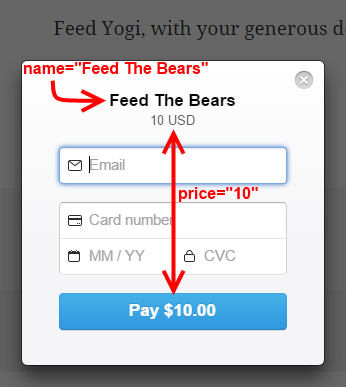
stripe-donation-checkout-form

Using donation buttons are the simplest and quickest way to begin monetizing a WordPress site.  In this tutorial, I will show you how to use Stripe Payments to accept donations from your site easily.
Getting a Stripe account at stripe.com is quick and easy.  Barring approval complications, it should take no more than 5 minutes to sign up, and activate your account.  Compared to other payment processors, only a minimal amount of personal information is required.  You will however, need a valid bank checking account, in order to successfully activate your Stripe account.
Once your Stripe account has been activated, download, install and activate the WordPress Stripe Payments plugin.

Stripe API Key Setup

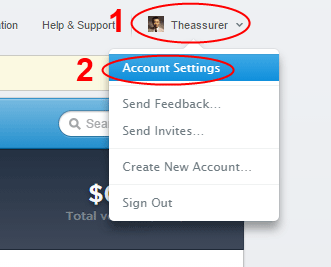
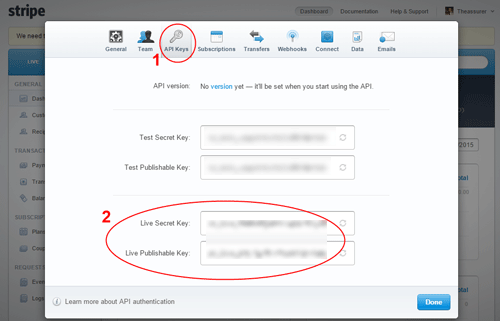
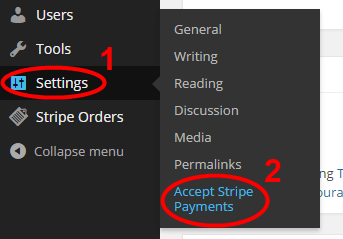
Next, you will need to know what your Stripe API Keys are.  You find out what your API Keys are by going to Account Settings, after you are logged into your Stripe Account, and then selecting the API Keys tab.
stripe-account-settings-menu
stripe-account-settings-api-keys
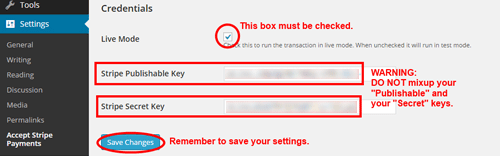
Your Stripe account has 2 sets of keys, a “Test” and a “Live” set.  For our purposes, we are only concerned with the “Live” set of keys.  Each set of keys contains a public “Publishable” key and a personal “Secret” key. It is important that you NEVER mixup or confuse your “Publishable” and your “Secret” keys.
You’ll then copy your Live API Keys into the Credentials section of the Stripe plugin.  When copying the keys from the Stripe API Keys tab, be careful not to copy trailing spaces when you select the key values.  Accidental copy/paste of trailing spaces accounts for almost all API Key authentication errors.  Also be careful not to mix-up and paste the wrong value into the plugin’s API Key fields.
stripe-paymens-plugin-settings
stripe-paymens-plugin-settings-part2

Creating the Stripe Donation Button

At this point, you are now ready to create your first donation button on a post or page.
In this example, we are creating a $10 donation button, for the “Feed The Bears” cause.  Our shortcode uses the following attributes:
  1. Name of our cause: name=”Feed The Bears”
  2. Quantity is non-applicable to donation buttons: quantity=”n/a”
  3. Price we are asking for: price=”10″
  4. Button text: button_text=”Donate Now”
Our completed shortcode would then look like this:
[accept_stripe_payment name=”Feed The Bears” quantity=”n/a” price=”10″ button_text=”Donate Now”]
stripe-donation-shortcode-in-a-page
Because the shortcode only renders the actual donation button, you would need to precede the shortcode with your own donation pitch. This gives you the freedom to say whatever message you want to add just above or below the donation button.

Interacting with the Donation Button

Your visitors can now click on the donation button to send a donation to you.
When the button is clicked, a “Checkout” form appears as a screen overlay so the visitor can enter the credit card details and make the payment.

9 Powerful Tips for Using Facebook To Boost Your Ecommerce Store

With more than 1.5 billion registered users, a figure continuously rising, Facebook is a social networking powerhouse. It’s worth more than the annual output of many countries and has users from all across the globe. The amount of data Facebook has, and the detail with which people willingly share information about them on Facebook, makes it any marketer’s dream platform. Just look at some of these stats.
  • Facebook has more than 1.5 billion registered users.
  • More than 699 million people log in to Facebook every day.
  • An average person spends around 15 hours and 33 minutes on Facebook every month. This makes it a total of 700 billion minutes globally.
  • More than 2.5 million websites have integrated with Facebook.
Currently there are thousands of Facebook pages where people are selling products directly to their fans. While it’s not always the best strategy to depend completely on Facebook for ecommerce sales, it certainly can be a part of your broader ecommerce plan.
If you have an ecommerce website or an online store, you can use the power of Facebook to reach your target customers much more effectively and drive them to your online store and boost sales.
Here are a few tips for using Facebook to strengthen your ecommerce store.

1. Content is the King – Even on Facebook

Quality content is the king everywhere. But the kind of content that resonates with Facebook users is very different from blog content or articles. Here, if you write 1000 word status updates, very few of your fans will have the patience to read till the end.
Facebook users like short, catchy, visually appealing and action oriented posts created in a fun way. Above all your posts should provide users value. Demonstrate your knowledge about your niche and products in your status updates.
Also, don’t be obsessed with your own product images, links and blog posts all the time. Regularly share stuff from other blogs and websites that your fans may find useful (not from your competitor’s site, of course).

2. Optimize Your Store for Facebook Engagement

Your ecommerce store should also be optimized for maximum Facebook engagement (Likes, Comments, Shares). You can do that in a number of ways. Offer sign up via Facebook. Make sure your store’s product pages have clearly visible social media sharing widgets. Add the Facebook comments widget to your product pages so that the user comments are visible on their Facebook profiles as well. Add a small statement below the product images encouraging users to share on Facebook.
These are basic things but many ecommerce stores don’t have them in place because of which they fail to take advantage of Facebook.

3. Use Engaging Descriptions and Smart Calls To Action

Whenever you add new products to your store, you’d most likely share them on your Facebook page. When you do that, make sure you add an engaging 1-2 line description with your links. Engaging or catchy descriptions drive more clicks as compared to simple link shares.
Use high engagement words in your posts. Research shows that status updates that include the words Facebook, Why, Most, World, How, Health, Bill, Big, Says and Best get most engagement and shares. Similarly,
  • Posts with less than 80 characters attract 23% more engagement.
  • Using emoticons increases comments by 33%.
  • Question posts get 100% more comments.
  • Quotes get 26% more Likes and 19% more shares.
Also, make your descriptions action oriented and add clear calls to action with them. Facebook recently introduced the “Add Call to Action” option with status updates. Always use it with your status updates and link shares.

4. Boost Sales With Contests, Deals and Special Offers

Facebook users love contests and discount deals. Running competitions is found to be the most effective engagement technique for ecommerce stores. Almost 35% users “Like” Facebook pages to participate in contests. So give them what they want. Ask questions and use “Like for Yes, Comment for No” type techniques for feedback. These small fun activities can boost your engagement significantly.

5. Focus on High Quality Visual Content

I’ve already mentioned the importance of content, but visual content deserves a separate mention. Facebook users love visual content like images, info graphics, videos, memes etc. Image based content gets almost 40% more interaction as compared to simple text posts.
But to get the best results, you need to mix up your updates with a combination of text only, text+image and image/video only updates. For ecommerce stores, product images get the highest engagement.

6. Run Targeted Facebook Advertisements

There’s no better paid advertisement mode for ecommerce stores than Facebook advertisements. Facebook Ads have improved drastically over the last couple of years. They’re not only much simpler to configure but also bring much more targeted results as compared to other advertisement modes. You can target users based on their location, interests, gender, like/dislikes, recent activity, pages liked and dozens of other criteria. Start with a small budget of around $50 and test different ads to see what works well for you. Once you understand how it works, increase your budgets gradually.

7. Simplify the Buying Process

One important thing is to make the payment and buying process as simple as possible for your customers. Normally ecommerce stores add a link to the product pages with their Facebook status updates. There’s nothing wrong in doing this, but since it involves multiple redirections, there are high chances that buyers would abandon the purchase mid-way through. A smart option is to use a direct link to the checkout page or, even better, use a Facebook app to accept payments directly on Facebook. There are several Facebook ecommerce store apps where you can configure your products for direct selling on Facebook.

8. Use Facebook for Customer Support

A great way to show your fans and prospective buyers that you care about them, is to move the customer support to your Facebook page. Ask users to share their product feedback, compliments/complaints and concerns of your Facebook page. Actively respond to such comments, and ensure quick problem resolution. This will show the world that you really care about your customers.

9. Use a Combination of Manual and Automated Posts

Most ecommerce stores serve customers belonging to multiple countries, due to which they need to operate in different time zones. Of course you can’t stay on Facebook all the time. So it’s recommended that you automate some of your posts to stay in touch with customers from all time zones. You can use the BufferApp or HootSuite for this purpose. But keep posting manually as well.
Research shows that the engagement levels are 18% higher on Thursday and Friday, and 32% higher on weekends. Every day, around 1PM gets the most shares and 3PM gets the most clicks. Keep these time slots and days in mind while scheduling your automated posts.

Conclusion

Like any other social network, Facebook thrives on user engagement. The more closely you engage your audience through high quality visual content, contests and comment responses, the more action you’d be able to drive from them. But remember that your goal is to route users from your Facebook page to your store, because that is where you can convert them into subscribers – your biggest online asset.